This is likely a real dumb question…but bear with me. I am lazy and when I get a mfg model of a MOSFET (P or N) that is a subckt (and most of them are), I have a ready-made MOSFET (P or N) symbol that I open, then I copy the .lib text, paste it in the symbol editor and it populates the pins, but with the names that are in the .subckt line. I move them to match my MOSFET symbol, but then I would like to make those names invisible, before saving off the resulting symbol as a part. The other question on this subject assumes schematic editor, but the solution given doesnt seem to work in the symbol editor. Thanks in advance
Are you referring to this? Pin label with centered justification will make the label invisible. Double-click the pin or pin label, then click the center red dot.
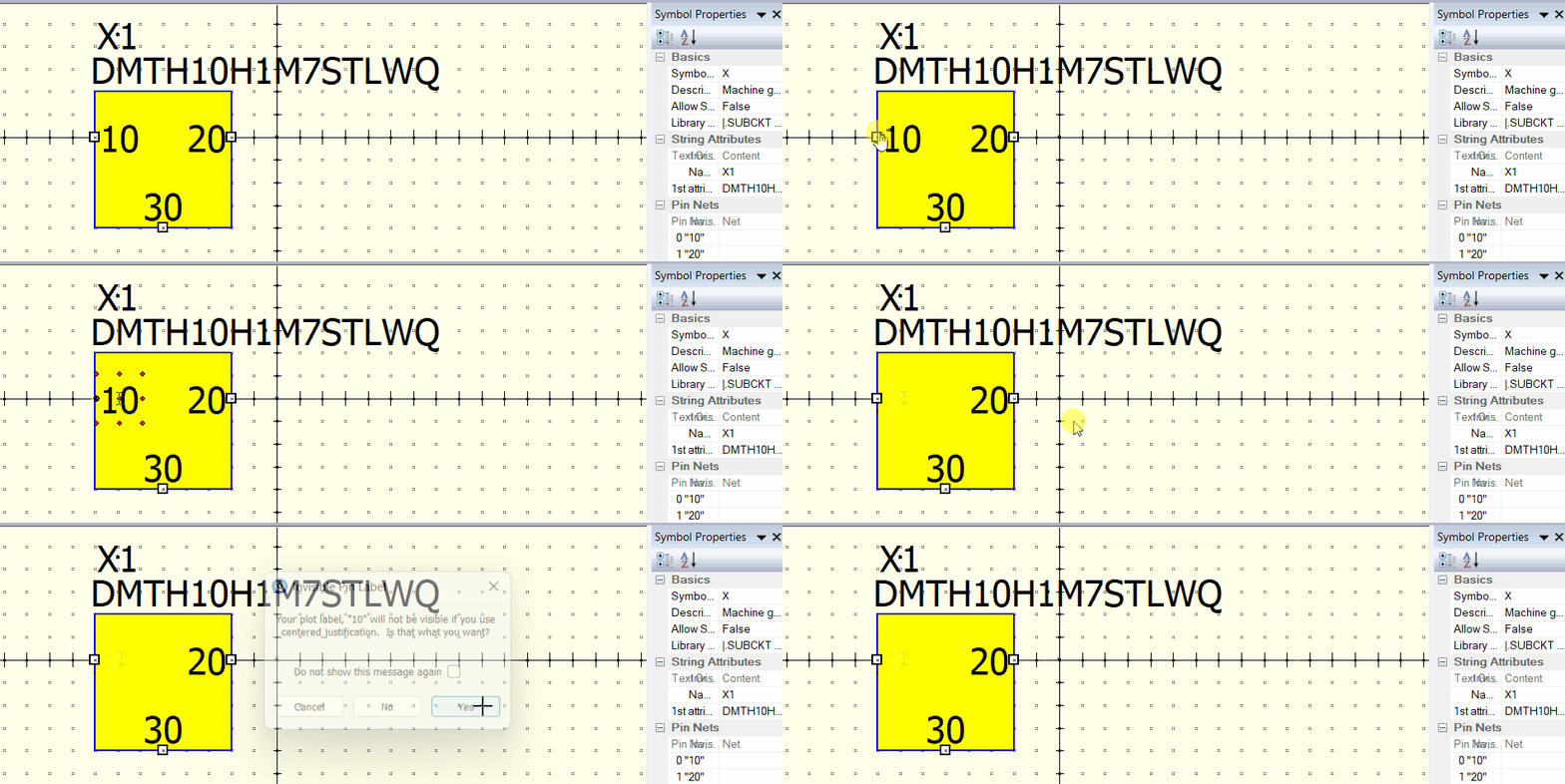
I just added a post explaining the workflow to use 3rd-party custom symbols for your reference, in case you want to save time in this operation.
General Guide to Import an Infineon SPICE MOSFET Model - QSPICE - Qorvo Tech Forum
2 Likes
Boy do I ever feel dumb. The only thing making me feel better is knowing that 10 other people probably viewed this and went “So that’s how its done”. 
 There are many tricks not mentioned in Qspice help. I tried to document as many as I could in the guidelines that I uploaded to my Github. However, asking in the forum is the quickest way to get an answer from frequent users.
1 Like