General Guide to Import an Infineon SPICE MOSFET Model

Keywords: Infineon MOSFET model, Infineon SPICE model, Import model

It is a common question about importing or auto generation symbol for Infineon MOSFETs in Qspice. This instructional guide can help you with this process.

Method#1 : Infineon MOSFET model with .lib directive

The most direct and easy way to use an Infineon model is with the .lib directive, as it is related to the structure Infineon uses to set up its MOSFET library (will be explained later).

This guide uses the OptiMOS5 BSC040N10NS5 as an example. First, go to the Infineon website, search for the device part number, and download its library. The Infineon library is in a zip package. Extract the zip package and navigate to the FET series sub-folder (e.g., OptiMOS5). Look for the library with the name xxx_Spice.lib, open it with a text document, and use the text search to confirm the .subckt model is present. Copy this library to your simulation directory.

Infineon provides subcircuits (.subckt) for its FETs with different levels of simulation detail, which are named as -L0, -L1, -L3, etc. This is crucial as different levels can have varying pin counts and pin sequences in their .subckt. Matching the pin count and pin sequence is essential in the symbol to call a subckt for use.

In this example, we use BSC040N10NS5_L1, where you can find a .subckt statement in the OptiMOS5_100V_Spice.lib file representing a total of 3 pins in the order of D, G, S.

.SUBCKT BSC040N10NS5_L1 drain gate source PARAMS: dVth=0 dRdson=0 dgfs=0 dC=0 Ls=350p Ld=100p Lg=2.2n

Now, you know you need a symbol with 3 pins in the order of D, G, S. I have built subcircuit symbols for Qspice, which you can directly download from my Github (KSKelvin-Github/Symbols-KSKelvin), Infineon subckt symbol in this directory
/Symbols-KSKelvin/subckt symbol (third-party model)/mfg/Infineon/

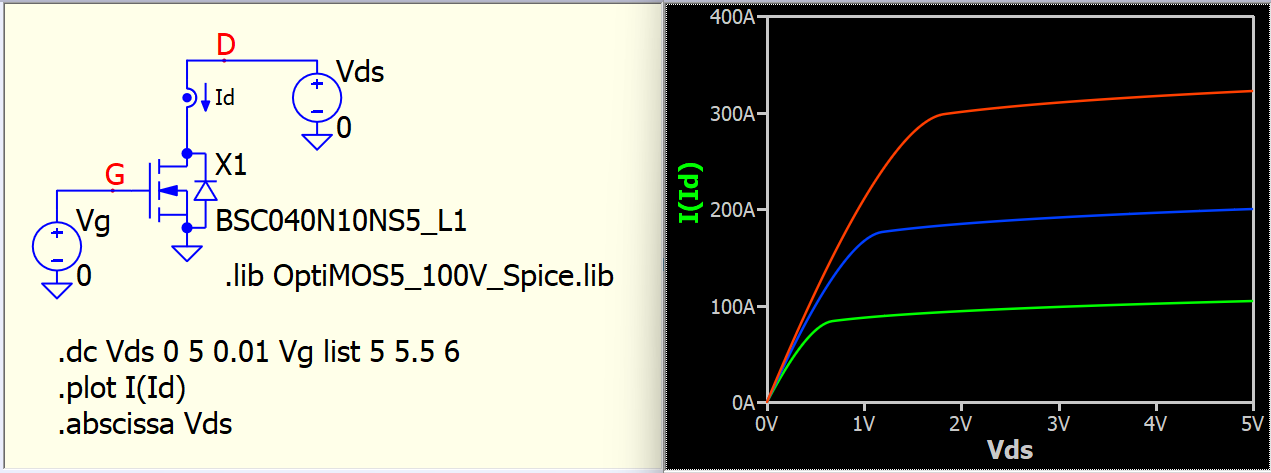
You will need the FET-L0-L1-subckt-D-G-S.qsym symbol. Drag and drop this symbol into the schematic, change the to BSC040N10NS5_L1, add the directive .lib OptiMOS5_100V_Spice.lib, and your setup is ready. The symbol will search files in .lib to identify all .subckt and its dependent subcircuit. This is the easiest way to use an Infineon MOSFET, and I highly recommend this method as you can switch to other MOSFETs in this library by simply changing the name.

OptiMOS5_100V_Spice.lib (282.6 KB)
example.Infineons-BSC040N10NS5-library.qsch (5.5 KB)
3 Likes

Method #2: Use the Qspice Autogenerate Symbol method

In general, copying and pasting the entire subcircuit netlist library into the Qspice schematic triggers the Autogenerate Symbol feature, and the generated symbol typically works. However, this is not the case for the Infineon library. The prerequisite for the Autogenerate symbol to work is that all dependent subcircuits must come after the main subcircuit, but the Infineon MOSFET library places dependent subcircuits at the very beginning in the library file.

To overcome this issue, create a new blank text file. Firstly, search for the main subckt in .lib, copy everything between .subckt and .ends in that section, and paste it into the blank file. Next, observe any dependent subcircuit names (found in X-device statements). In the .lib file, find those dependent subcircuits, copy them, and paste them following the main subcircuit in the blank file. For BSC040N10NS5_L1, it should look something like this:

.SUBCKT BSC040N10NS5_L1 drain gate source PARAMS: dVth=0 dRdson=0 dgfs=0 dC=0 Ls=350p Ld=100p Lg=2.2n
    :
.ENDS
.SUBCKT S5_100_e_var dd g s0 sp Tj PARAMS: a=1 Rsp=1 dVth=0 dR=0 dgfs=0 Inn=1
    :
.ENDS

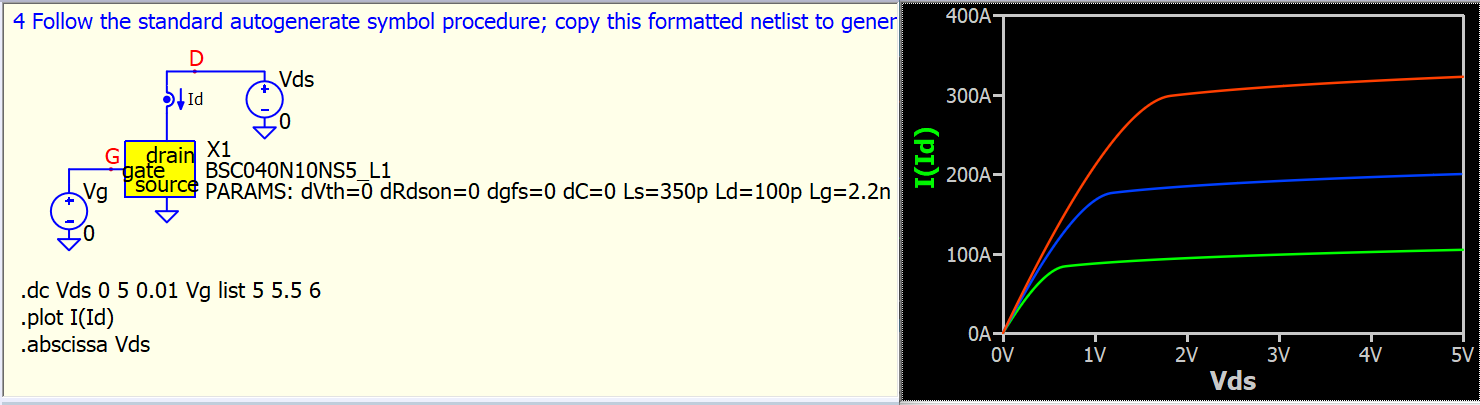
With the correct netlist sequence, you can now copy and paste this into Qspice and follow the standard Autogenerate Symbol procedure to create a functional subcircuit symbol.

BSC040N10NS5-L1(for auto generate symbol).txt (5.9 KB)
example.Infineons-BSC040N10NS5-embed.qsch (9.6 KB)

This is an embedded subcircuit symbol, signifying that you no longer have to share the library file along with this schematic. Only the .qsch file can function independently as the .subckt netlist is included in the Qspice symbol.

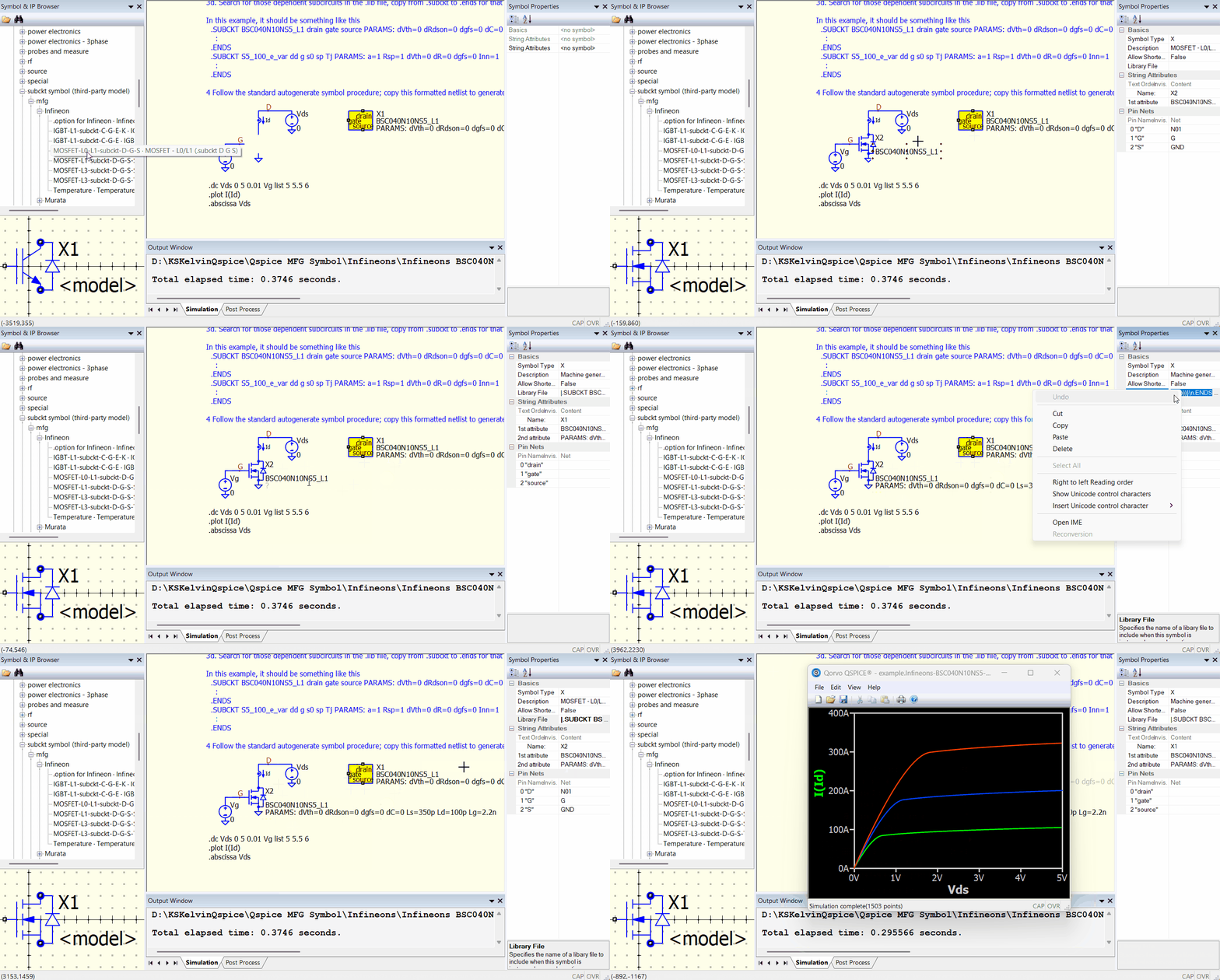
For the final step, you may want a graphical symbol. Once again, you can utilize the FET-L0-L1-subckt-D-G-S.qsym from my custom subcircuit symbol library. This GIF demonstrates the process of transforming an autogenerate symbol into a custom symbol.
example.Infineons-BSC040N10NS5-library.qsch (5.5 KB)
from Autogenerate Symbol to Custom Symbol

2 Likes

About Infineon models - Simulation speed and convergence
In general, Infineon models typically run very slowly or returning timestep too small in simulation. This is a well-known issue within the community and is not unique to Qspice. To address these issues, you can use .option fastmath=0 and reduce timestep to a smaller value with .option maxstep=[value] in Qspice.
https://forum.qorvo.com/t/hb-simulation-with-infineons-gan/24205/4

While I couldn’t find a specific reference from Infineon, ROHM, in a similar model, mentioned in its article “New SPICE Models with Improved Simulation Speed for Power Semiconductors Are Released!” that ROHM -L1 is designed for high precision of static characteristics, whereas -L3 offers better convergence and higher speed for evaluating dynamic characteristics. There is no direct comparison to Infineon, as ROHM -L2 seems similar to Infineon -L3, and Infineon does not mention anything about a better convergence model.
https://fscdn.rohm.com/en/products/databook/white_paper/discrete/sic/mosfet/new_spice_model_for_faster_simulation_of_power_semiconductors_wp-e.pdf

I suggest using the Qspice MOSFET Model generator (File > Model Generator > MOSFET) to create a model based on the datasheet. Your simulations will likely run much better and quicker with a native model from Qspice.
This is my unofficial model generator guideline for reference : Model Generators Guide by KSKelvin.pdf

2 Likes

General workflow to import MOSFET subcircuit model

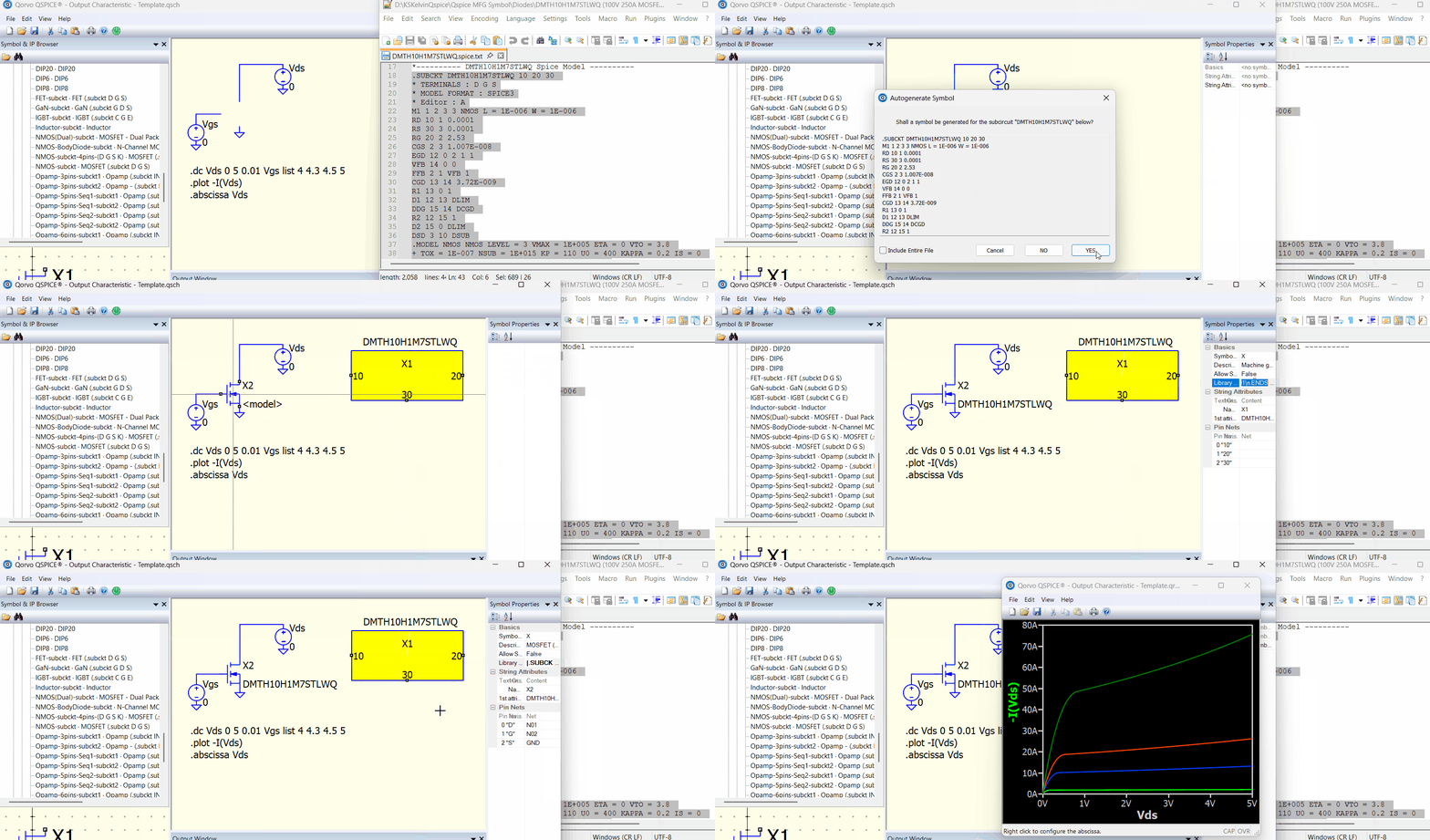
A Subcircuit (.subckt) can be imported into Qspice with auto symbol generation by copy and paste its .subckt netlist (or by pulling the subckt file into the schematic). To save time relocating its pin or symbol drawing, you can take advantage of using pre-built symbols. This animation demonstrates the workflow. In general, most MOSFET subcircuit models don’t include parameters lines like the Infineon model. Therefore, I have re-captured the workflow for a general model.

Animation

You must observe the .subckt for pin count and pin order, and select custom symbols that match that order.

You can download my custom symbol library, and in the folder “subckt symbol (third-party model)”, it consists of various custom symbols built to support 3rd-party .subckt models.
Qspice/Symbols-KSKelvin · KSKelvin-Github/Qspice

Feel free to contact me if you need any subcircuit symbol templates that are not included yet.