Hello. A question to the community.
Trying to use the tool for didactical purposes, I face the problem than making even the simplest circuit with one source and some resistors one needs multiple steps to get the “right” readings. If I just place a V source and then some resistors using R key, then Ctrl-R to rotate, yet another group of Rs and finally Ctrl-R and a third one. Then simulating that basic circuit, I will have currents through R in “all directions” because apparently the polarity is not preserved and I would need to check every R by hand to properly get it. In a bridge circuit that means I will for sure need to examine the Netlist or every R property to get it right. That is quite some overhead for the students.
Is there a simple way to see the polarity/pin names during the placement?
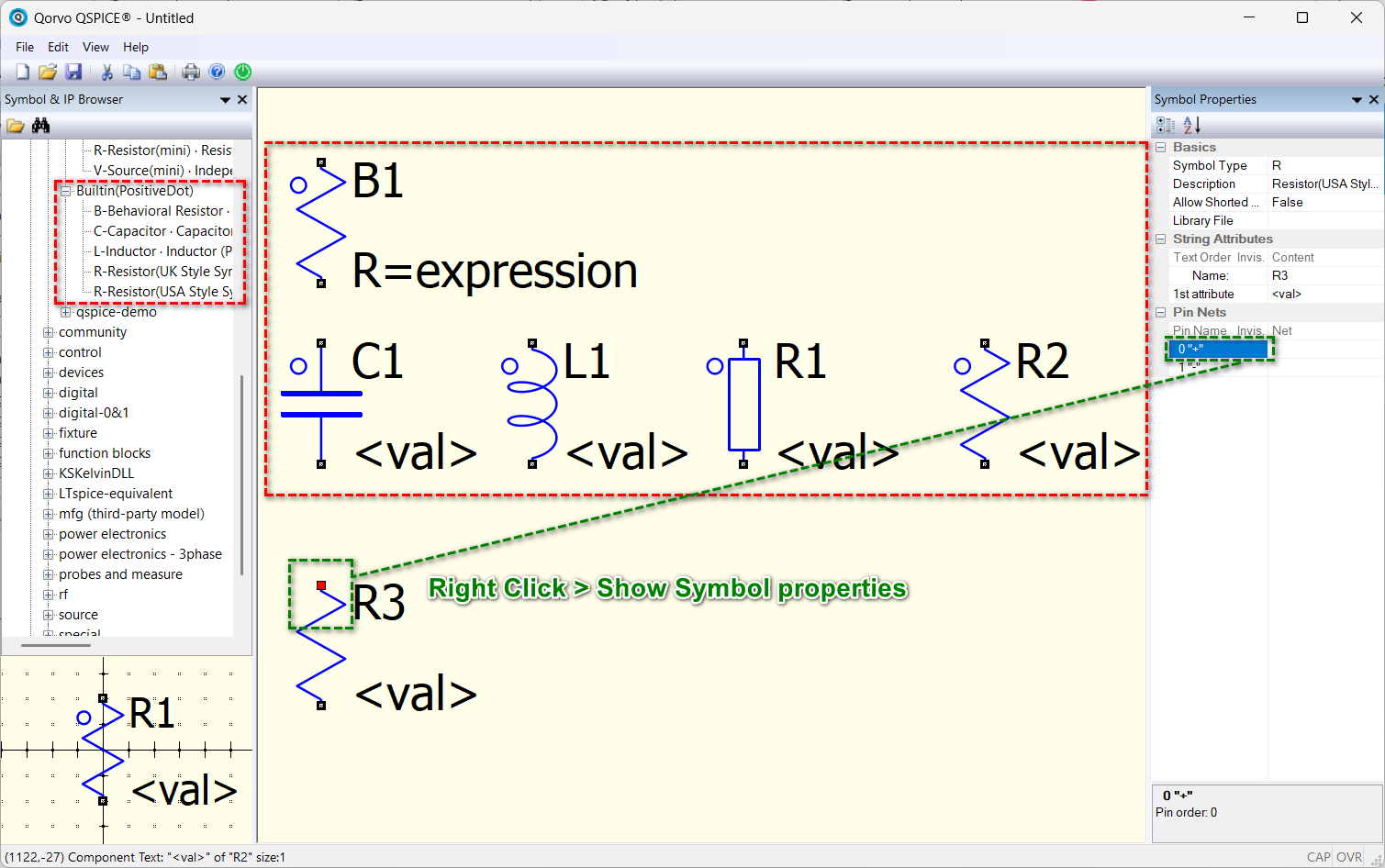
The solution is to right-click on a component to show Symbol Properties, click on the Pin Name, and it will highlight the corresponding pin in the schematic. Alternatively, you can download my custom symbol library (Symbols-KSKelvin), which consists of components marked with a dot to indicate their positive terminal : /Symbols-KSKelvin/.qspice-alternative/Builtin(PositiveDot)/
But my practice is to either directly place a resistor (vertical) or rotate it once (horizontal). This ensures that the current flows from top to bottom or left to right. I never use multiple rotations for R, C, and L (L have a right-click option to show its phase dot).
Thanks for the information, I will need to try your library.
For the elements placing I have the habit of using hotkeys in PCB CAD editors. When you need to place 5-10 resistors in a single pass more rotations are usually needed it is a pity one cannot see by default the names of the pins. Would have been great to have an editor option to show the “Pin Name” fields from the symbol properties displayed next to the corresponding pins at placement time. Sort of a flag or setting one could switch on/off with a hotkey. It would solve so many problems for new users as going every time into the symbol’s properties to check, it is a huge overhead of klicks and time.
Thanks, probably need to ask it in the wish-list, because as it is now it is not very newcomer/student friendly in that area…