I have made my best attempt to simulate a three-phase active frontend looking at various articles and things, and have failed thus far. I was wondering if anyone had attempted this? I can attach what I have developed so far if there is someone who may be able to provide feedback.
I did it many times. What exactly fail means here?
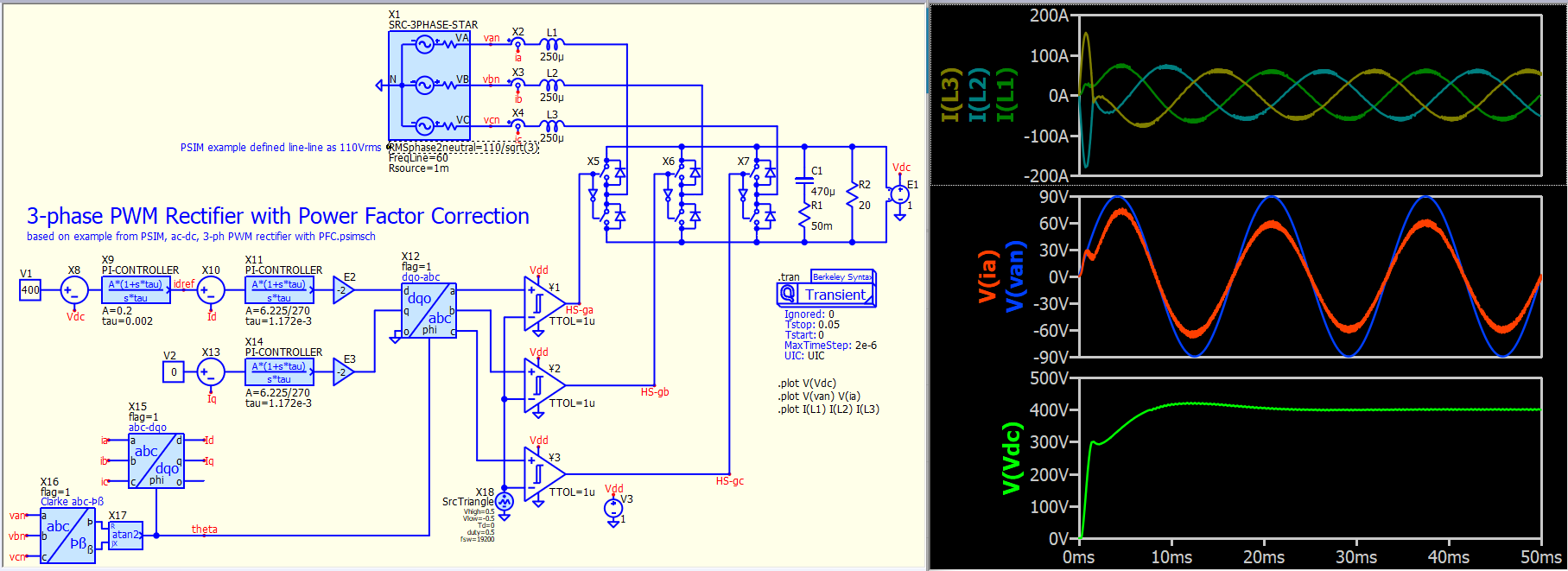
Unlike @physicboy, I have never worked with 3-phase PFC, but PSIM has an example, and this is the Qspice version for that. Many symbols in this example are not native Qspice devices but are from my custom symbol library. I believe this is likely a textbook example.
KSKelvin Github : 3-ph PWM rectifier with PFC.qsch
Qspice screen capture
PSIM screen capture : 3-ph PWM rectifier with PFC.psimsch
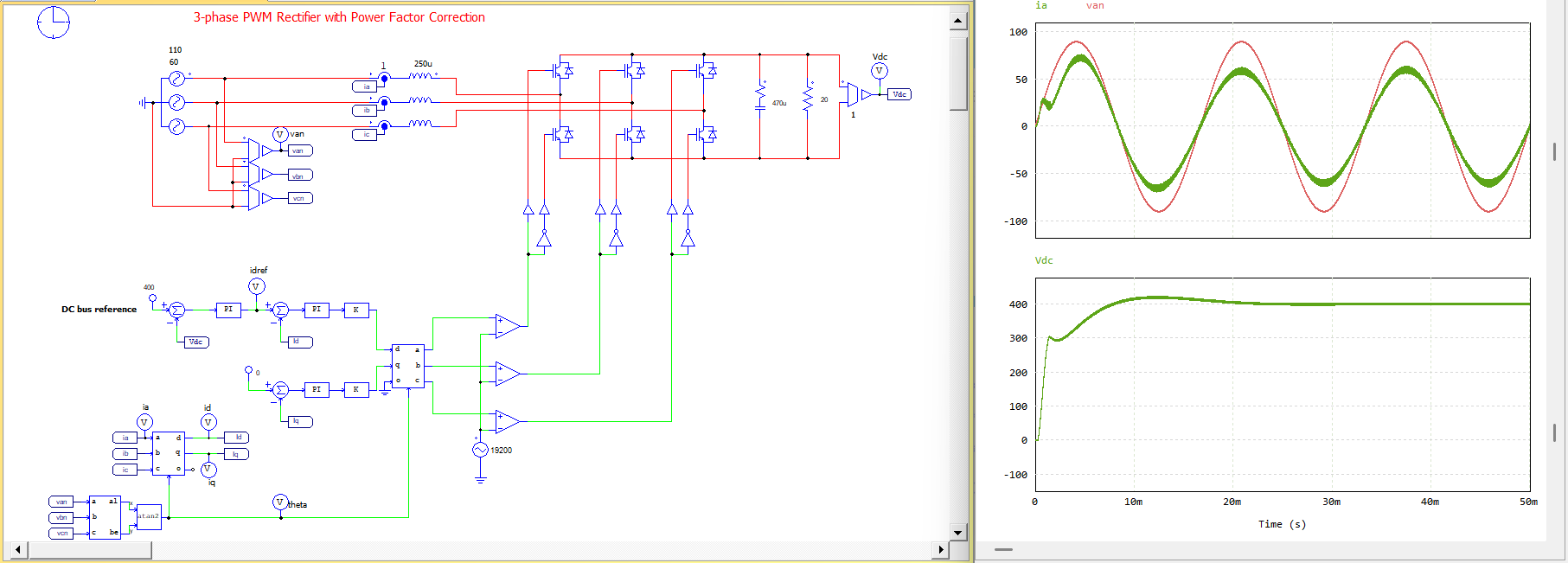
Good things @KSKelvin make that example.
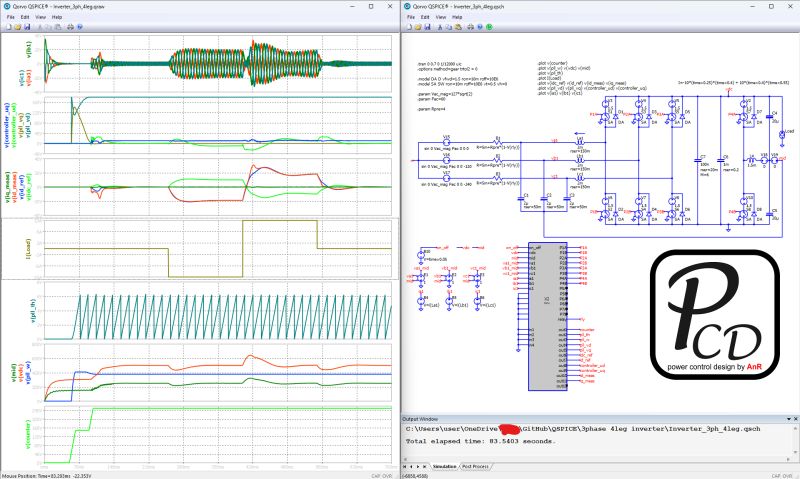
Actually just 2 days ago I release my 3Ph AFE sim with Cblock controller. Anyway, it’s 100% in C, including the PWM implementation.
It runs fast, unfortunately not beginners friendly
Edit, add screenshot:
1 Like
I assumed you had an example in your library when I saw @xoviat’s question. This level of C++ code exceeds my skills. Does this example compile with other C++ compilers?
You meant the whole C project?
I suppose it only work for Digital Mars, though it should work with minor modification for Visual Studio or other compiler.
@RDunn , do you mind sharing a brief intro what it takes to make the code compile-able in other compiler?
Oh, I haven’t downloaded this project but just the schematic and .dll files. I noticed a directory named “.vscode” and therefore, I assumed it was not for Digital Mars. 
Oh… It’s still compiled by DM, I only follow @RDunn method to directly compile it from VScode with the DM inside Qspice installation.
The compile command is described in task.json in that .VScode folder. it’s not totally complicated, you can ask ChatGPT to learn and adjust it for you.
It’s very convenient to edit and compile directly from VScode particularly when your code grows past a few hundred lines and you need to split (modularize) into different .c/.h
@physicboy, I cannot load more knowledge into my brain recently; feeling physically exhausted… but, @RDunn, where is your tutorial for VScode with the Digital Mars?
It’s in the VSCode folder of the repository.
I bet you can just copy that .VScode folder and put it in your source code folder
Anyway, in your VScode you need to install some C/C++ add on (intellisense and another one that that I forget the name)
Okay… in short, you use Visual Studio Code but modified @RDunn’s tasks.json to compile with Digital Mars instead of MinGW. I haven’t touched VSC few years.
In short, @xoviat can only download .qsch and .dll files to run your example. Does he need to set up VSC in case he would like to modify the code?
Generally, it’s a matter of:
- Setting up an IDE for the more modern compiler. Learning the new IDE is a bit of pain but worth it in the long run.
- Configure the IDE for the project (32-bit Windows DLL).
- Compile the code, fix the errors and warnings.
- Test.
The DMC compiler is generally compliant with C++98 so, if the modern compiler supports that ancient standard, you could (in theory) set the compiler options for C++98. I’d recommend, instead, at least C++17. (It is mostly backwards compatible so any errors would likely be due to occasionally non-standard DMC libraries. Most warnings would likely be due to better variable type checking.)
Not sure what else to add without getting into the weeds.
–robert
This is a simpler project he can just compile directly from Qspice.
Qspice can’t compile directly if source code is located at different folder, or involved some build dependency.
Example for this two case is here for my PWL LOSS analyzer.
I keep the source code at subfolder to keep the file neat, but later place the .dll at the main folder to ensure Qspice and find the .dll for the library call.
Additionally, I use json for the loss model input file, and to use it I need cJSON library which unfortunately must be compiled separately with my own source code then later linked to my source code. This compile magic won’t work with default Qspice compile command.
In such case I just need to brave myself and brace all the error code… Got it sir 
Yeah. But once you discover how much better the error reporting is with newer tools, you’ll thank me. 
I’ve downloaded your code and testing with VSCode configured for VC. Will report back shortly.
The most painful error I needed to debug is
Calling abs(x) for which x is defined as double.
For @KSKelvin to help you understand abs() → for integer only, you need fabs() for float or double.
In DM, it will compile without triggering error…
OK, a few changes and it works with VSCode compiling with VC (MSVC 2022):
- Save the attached tasks.json to the .vscode folder (remove .txt suffix).
- Remove “extern” from declarations/definitions in .c/.h other than mcu.*.
- Add this before #includes in mcu.c to pick up M_PI definition: “#define _USE_MATH_DEFINES”
- Select the “*** MSVC 32-bit DLL *** cl.exe build active file” task to compile.
Regarding #2: You used #include xxx.cpp in header files as a convenience to allow DMC to compile a single source file. Therefore, no “extern” is required. If you were to configure the compile/link differently such that each *.cpp generated a separate *.obj and the linker combined them, some of the “extern” declarations in header files might be needed. Since this is a “single *.cpp compile” and I’m lazy, I simply removed all of them.
tasks.json.txt (867 Bytes)
This is one example of how much better modern compilers are – depending on what version of C++ you compiled for, the library would have either handled it correctly or produced a warning.
Thank you so much everyone! This has been so helpful for me.