5M-XFO.qsch (18.2 KB)
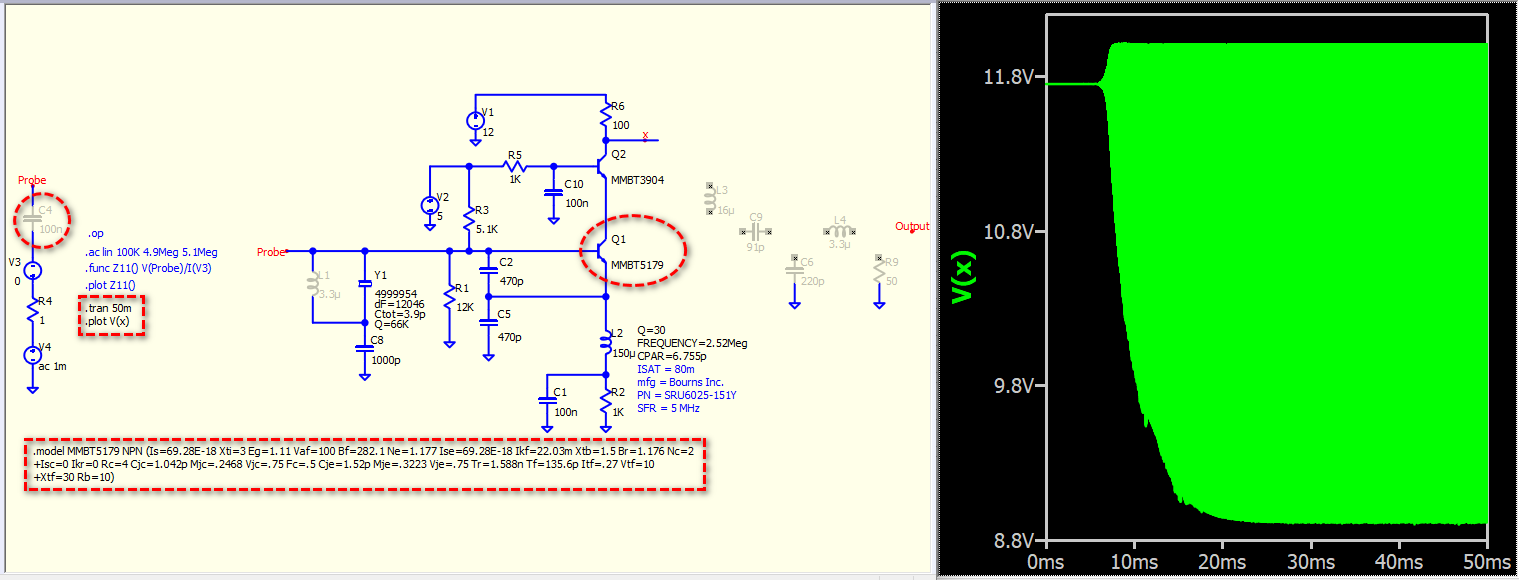
I designed a crystal oscillator that shows to have a negative resistance at the crystal frequency but nothing happens in the time domain. I am wondering what I am doing wrong. I get the same results when I replace the crystal with a resonant tank circuit.
The schematic you uploaded is missing the library file for Q1. Managed to find a .model statement for the MMBT5179 from the Onsemi datasheet. Review if this is same as your model.
.model MMBT5179 NPN (Is=69.28E-18 Xti=3 Eg=1.11 Vaf=100 Bf=282.1 Ne=1.177 Ise=69.28E-18 Ikf=22.03m Xtb=1.5 Br=1.176 Nc=2 Isc=0 Ikr=0 Rc=4 Cjc=1.042p Mjc=.2468 Vjc=.75 Fc=.5 Cje=1.52p Mje=.3223 Vje=.75 Tr=1.588n Tf=135.6p Itf=.27 Vtf=10 Xtf=30 Rb=10)
By including this model and disabling the 100n capacitor at V(Probe) [it reactance only 318ohms @ 5MHz], an oscillation waveform can be observed. I hope this helps you move forward with your project. In the future, providing a complete, ready-to-run file will save everyone time and result in better feedback.
5M-XFO-d260502t1707.qsch (18.5 KB)
MMBT5179.qsym (780 Bytes)
MMBT5179.txt (329 Bytes)
Yes. Here is the library files. I got the values from the transistor datasheet. Mine is now working also. I must have forgot to disable the probe coupling capacitor. Thanks for your help. I am loving QSPICE simulator much more than LTSPICE. Far more intuitive and faster simulation times.
1 Like
A surprising number of oscillator issues end up being layout related rather than the crystal itself. Trace length, grounding, and even nearby noisy signals can affect startup stability a lot. I’d also double-check the load capacitor values against the crystal spec because being slightly off there can cause intermittent behavior.
I haven’t even started building my oscillators. I am still in the simulation stage. I am finding more issues with time domain simulation of RF oscillators. I am noticing that the amount of time given in the “.tran X” statement will affect whether the oscillator starts up or not. There seems to be a need for some more testing and debug of the QSPICE software in this area. I have also noticed when I get updates that the Release Notes are not updated.
For oscillator simulation, you should add .option maxstep=<value>. SPICE simulation uses dynamic timestep, and we normally set a maxstep that is smaller at least one-tenth of the expected oscillating period, to make sure the simulation timestep is not overly aggressive. In addition, oscillator means there at least two possible states in the steady-state DC solution, and you might want to consider setting initial condition for a certain voltage node or device current to help the simulation be consistent.
Consider uploading your schematic and specifying which .tran statement gives you a different result. It is possible that what you are experiencing is not a bug, but a matter of simulation technique that is required to handle certain circuits. Using a SPICE program always relies on knowledge and experience.
There are many reasons. For example, Mike might be trying to fix a bug but it turned out to need more work, or he might be working on an unreleased feature, etc.
Here is my latest Oscillator Schematic with multiple .tran statements that can be commented in and out. I also included the transistor model from the Mfr Datasheet. I definitely see different start times using different maxstep values. I am currently tempted to just call it good when I get a negative resistance with zero reactance at the desired frequency and go from there.
Thanks for the help.
Oscillator.qsch (11.7 KB)
MMBT5179.qsym (780 Bytes)
MMBT5179.txt (329 Bytes)
Method #1 : At least 100 points for each cycle
Use .option maxstep=1/15Meg/100. As your oscillating frequency is 15 MHz, this restricts the simulation timestep to at least 100 points for each cycle.
An oscillator is a tricky circuit for SPICE. SPICE uses a dynamic timestep. For QSpice, the default maxstep target is Tstop/1024 if there are no other timestep-modification devices in the circuit. This oscillator doesn’t have timestep modification devices in its, therefore, it can be overly aggressive for .tran 1m. Just imagine what happens in a digital system if undersampling. SPICE is discrete calculation (actually, all electronic simulators use discrete math), timestep is an important part of it.
Method #2 : Loose maxstep, and reduce Max1stStep
If you prefer to set timestep, for example, just 10 points for each cycle (.option maxstep=1/15Meg/10), and needs all three waveform to overlap, you have to align their 1st timestep setting. for example,
.option maxstep=1/15Meg/10
.option MAX1STSTEP=1p
The point is, for this type of oscillator, you yield the exact same result from discrete math (numerical methods) with an exact timing profile. The first timestep in a simulation by default is 1ns (see .option in the Help file), and we need to reduce it to 1ps for exact timestep alignment between different .tran statements if your maxstep is not small enough.
But anyway, I just recommend setting the timestep to 1/f/100 or 1/f/1000 if you cannot tolerate the differences in results.
Thank you. That is very helpful.
1 Like
You are welcome. I forgot to mention that precision and total simulation time is the trade-off of the simulation timestep. Mike developed QSpice (also LTspice), and both target having SPICE handle switching circuit simulations. Switching circuits need detail and convergence at transitions, but need to run as fast as possible after a state change. In a switching circuit, we generally have a pulse source, clock source, or comparator, which by nature has a timestep control algorithm in it. But for a self-oscillator, its oscillation relies on LCR circuit; in solving a circuit, if your timestep is large, certain component effects look minor. SPICE has no way to identify that there is a high-frequency oscillation in a low-frequency sampling timestep condition. Just like if you measure a 100MHz sine wave by sampling at 100kHz on an oscilloscope, you just won’t be aware the 100MHz is there. That is why oscillators are particularly tricky and you have to pay more attention to their timestep settings.