Newbie questions – simulating a self-oscillating Class-D amplifier

I’m a retired EE, and in my 40+ years working life have never needed to use a circuit simulator. So this is the first time I’ve ever tried to use one! Analogue and logic/digital circuits, no problem understanding and visualising how they would work. But my current (hobby) project is designing a Class-D audio amplifier. And I simply can’t get my head around how to design a self-oscillating circuit.

The many demonstration/reference circuits I’ve studied feed the PWM switching signal back from the output transistor pair (from prior to the LC LP filter feeding the speaker – assume a single-ended output configuration) to be mixed with the incoming audio signal at the input of an op-amp ‘integrator’.

Some ref circuits follow the integrator with a comparator, some don’t. Either way, the integrator or comparator output feeds a purpose-designed IC (with an in-built dead-time facility) that drives the output transistors with a PWM signal. Some reference designs (e.g. the one I link below) suggest that the output from the integrator is a PWM signal, while others suggest it is a constant-amplitude triangle wave whose centre-line follows the audio signal amplitude.

This is one of the reasons I want to simulate the self-oscillating scheme, to see which it is from this particular circuit. The other reason is to find the ‘appropriate’ component values to produce the desired frequency of PWM signal with zero audio input (when the PWM freq is maximum).

For my simple simulation circuit I have substituted a high-voltage comparator for the whole ‘output’ section, to emulate what the gate-driver/output-transistor-pair would produce (though without any dead-time). My actual output stage will run from a single 36Vdc supply. The gate driver I’m planning to use (LMG1210) is non-inverting (‘high’ PWM input state turns on ‘high’ output transistor, pulling the output rail high), so I’ve used the comparator’s (+) input to simulate the correct phase.
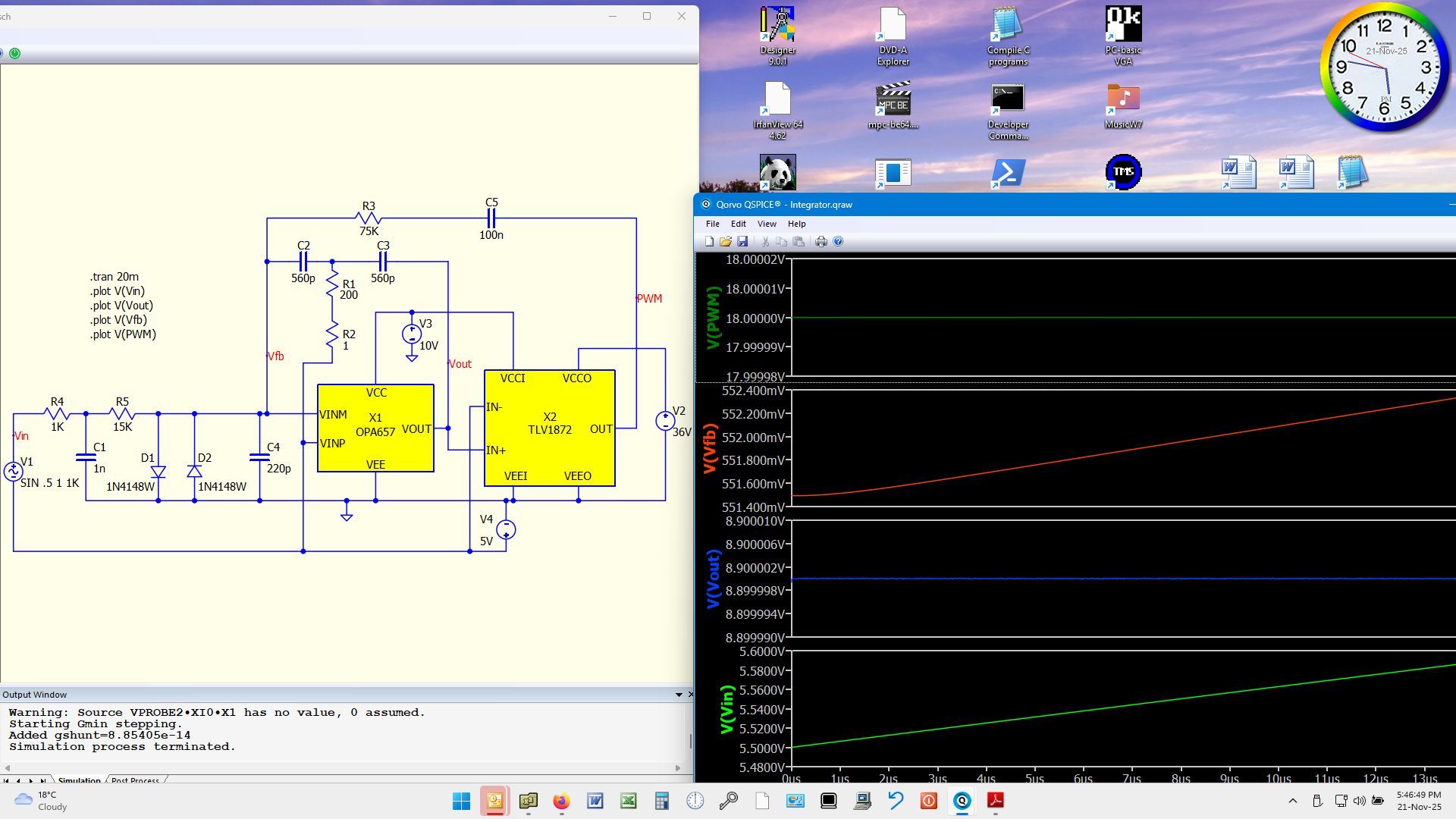
My front-end simulation circuit was taken from this Infineon reference design (page 39):
Reference design

I’ve generally used the same component values as the reference design shows, except for:

  1. I’m using a single +36V supply for the output stage, and only (+) low-voltage supplies for the input sections;
  2. Their pot (R44A) I’ve replaced with a fixed R2 set to minimum (to maximise PWM nominal frequency);
  3. I’ve added a DC blocking cap (C5) to stop the average 18V output signal from affecting the integrator’s input DC level.

My simulation problems are these:

  1. No oscillation at all at Vout
  2. The simulation is awfully slow, taking tens of minutes to simulate the desired 20ms total ‘real’ time.

Can anyone please help me with these issues?
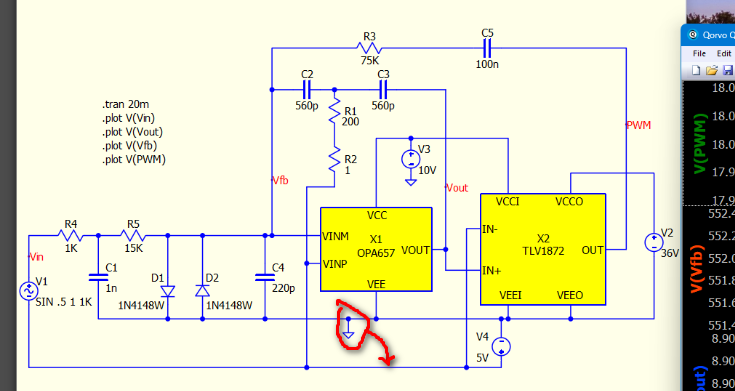
First spot… is this ground correct?

I believe the common connection is correct. For single-supply applications, the negative-most supply pin of devices goes to supply common (GND). The +5V supply is simply to provide half-supply DC bias to the integrator input, In the actual circuit it will probably be a divider from the +10V supply, with filter capacitors.

Incidentally, this is something I’ve believed for years, but am still amazed at how often, when you spend the time writing in detail about a problem, the solution suddenly becomes clearer. After writing-up my issue and sending it off last night, I headed for bed. As I was changing for bed, I suddenly understood how to analyse this simulation circuit using conventional analogue understanding of op-amps and integrators. I think I can do it now without simulating! I’ll spend some of this weekend on it.

Kelvin,
Thanks for the alternative simulation circuit you sent me. I modified it to reflect my intended configuration (single-supply), but after calculating appropriate R and C values for the ‘carrier’ frequency I’m aiming for, the simulation looks wrong.

Incidentally, I was thrown off by the non-standard definition of compatator hysteresis that Qspice uses! I had to search a couple of the help articles you’ve published to find that Qspice takes Vh (hysteresis voltage) as a ± value around a non-existent ‘middle’ threshold, rather than as the difference between the two actual thresholds, as all manufacturers use:
“The difference between the upper and lower trip points is equal to the width of the input-referred hysteresis zone.” (TI)
“Hysteresis is defined as the difference of the two trip points.” (LT)

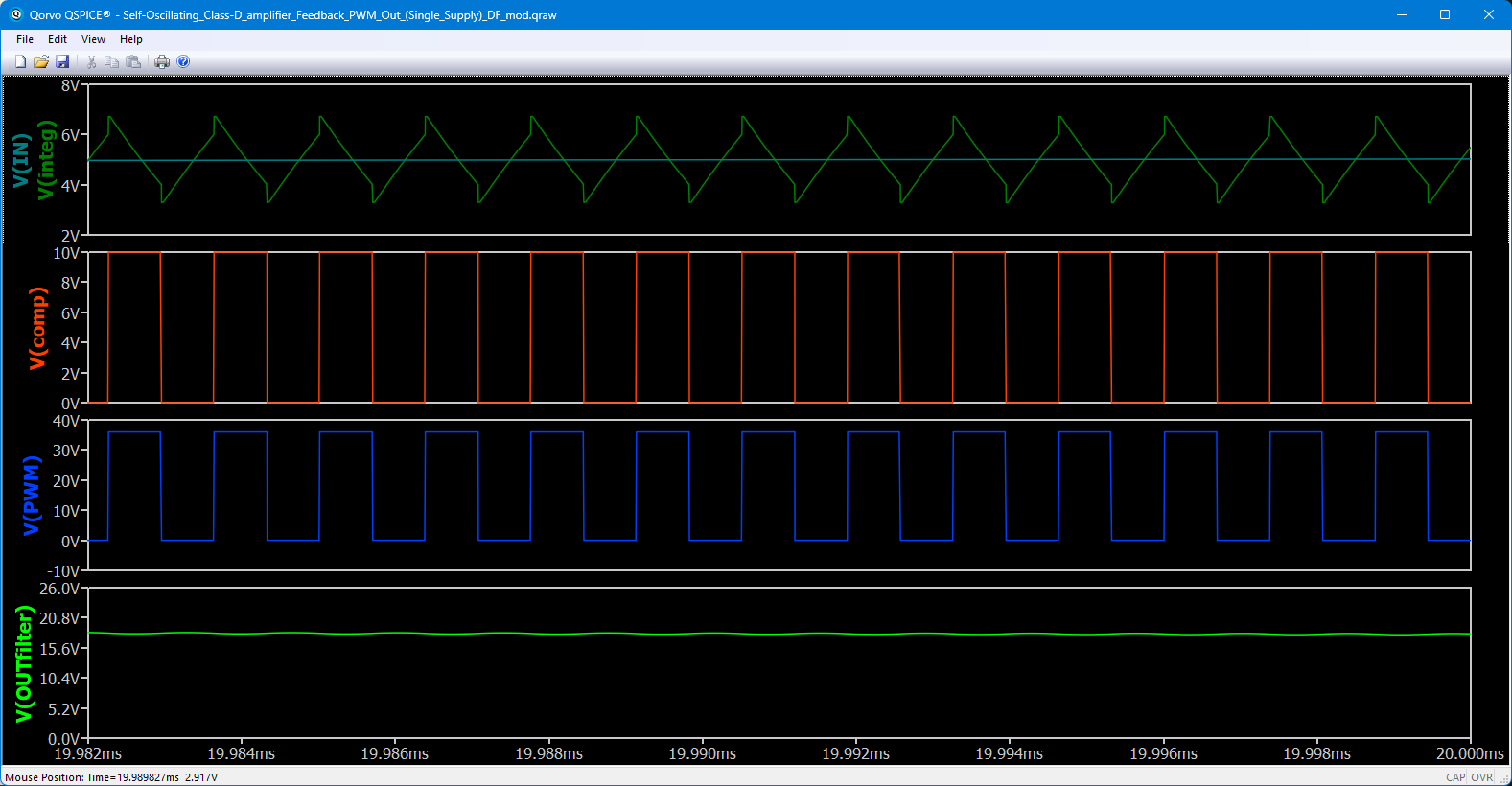
Anyway, my understanding of what the integrator should output is a sawtooth: a long rise when the PWM input is 0V (-5V relative to the integrator’s reference input) and a rapid fall when the PWM signal is +36V (+31V relative to the int. ref.). But the graph Qspice produces has a strange ‘step’ occuring at each threshold.

In addition to helping me understand that, would you please help me graph the PWM frequency vs elapsed simulation time. I don’t understand how to create a time graph. Additionally, when I run a simulation on this circuit, it does weird things (flashing different colours in the results window; possibly due to my incorrect attempt to plot frequency).

Oops, this site won’t allow new users to upload files. I’ll try to send you my simulation schematic and graphs screenshot in a PM.

Here is how you can gain access to file upload.
Qspice Forum - New User to Basic User (File Upload) - QSPICE - Qorvo Tech Forum

Definition of half hysteresis (Vh), is carried from SPICE legacy, as LTspice also defined in same way.

Qspice help in ¥-Device Schmitt Trigger

LTspice help in Switch

Let me upload the circuit in my PM message, such that other can join the discussion.
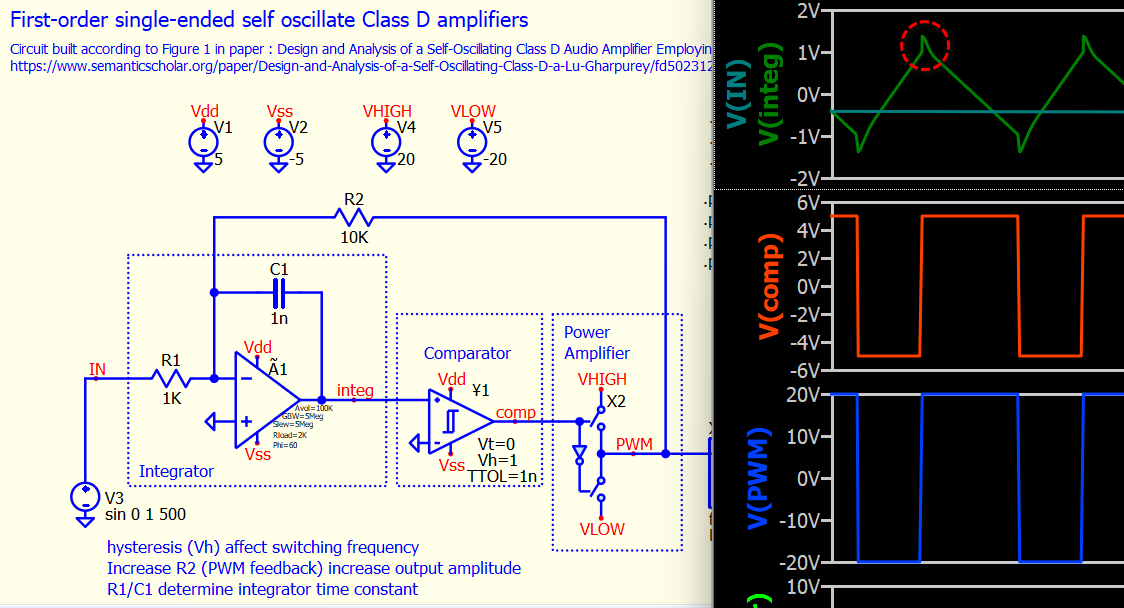
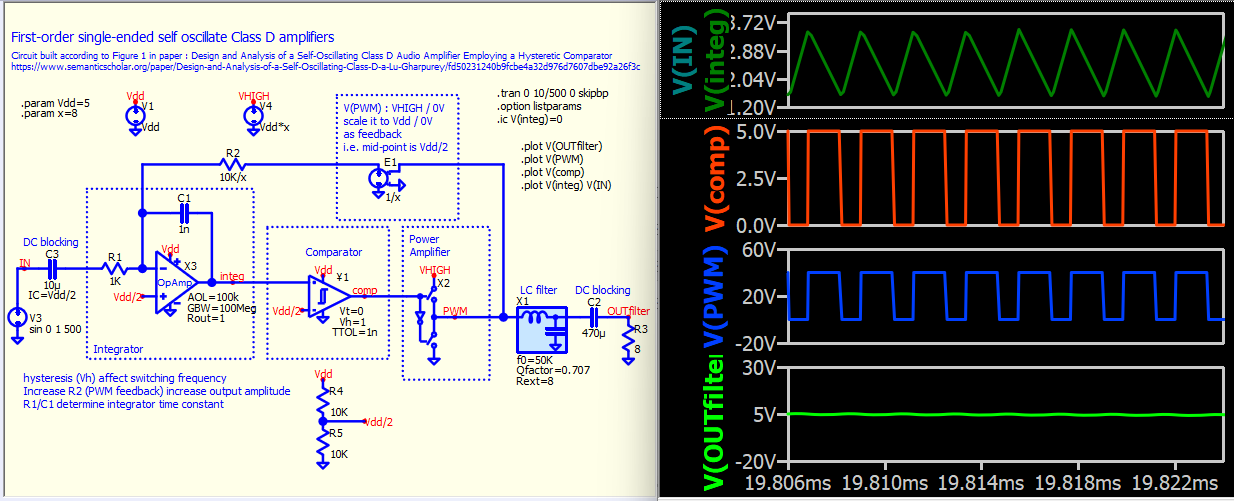
This is a textbook simulation of self oscillate class D amplifier.

Self-Oscillating Class-D amplifier - 01 - Feedback PWM Out (Dual Supply).qsch (15.3 KB)

Integrator output is a sawtooth. A sawtooth is not necessary to be a steep decay, and in this case, it is trianglar sawtooth. Input signal + Feedback from output modulates the slope of ramping up and down. Since the slope of ramping up and down can be different, and this sawtooth into a hysteresis comparator and can generate a changing duty sawtooth. (e.g. ramping up faster than ramping down, duty cycle increase). This sawtooth into the comparator and output a PWM with duty change according to input signal amplitude. This is how this self-oscillating class-D works.

This part is related to PWM output feedback through R2 into the integrator.

You want to modify this to work in single supply (i.e. Vss to GND and Vlow to GND)?

Yes, I have modified your ‘textbook simulation’ circuit for single supply, as per the simulation file I uploaded for you and linked in the most-recent PM.

But since then I’ve also changed some passive values and tried more simulations. The strange ‘steps’ in the integ output have gone, but I’m still seeing other puzzling behaviour. For example:

The comp output should switch at 4V and 6V input levels (5V reference ± 1V Vh). Assuming all the components downstream of the integ output are ‘ideal’ (zero delays and rise/fall times), then this (via the R2 feedback) would cause the integ output sawtooth to also change direction at 4V and 6V, but in the simulations I’ve run the direction changes occur at about 2V and 6V.

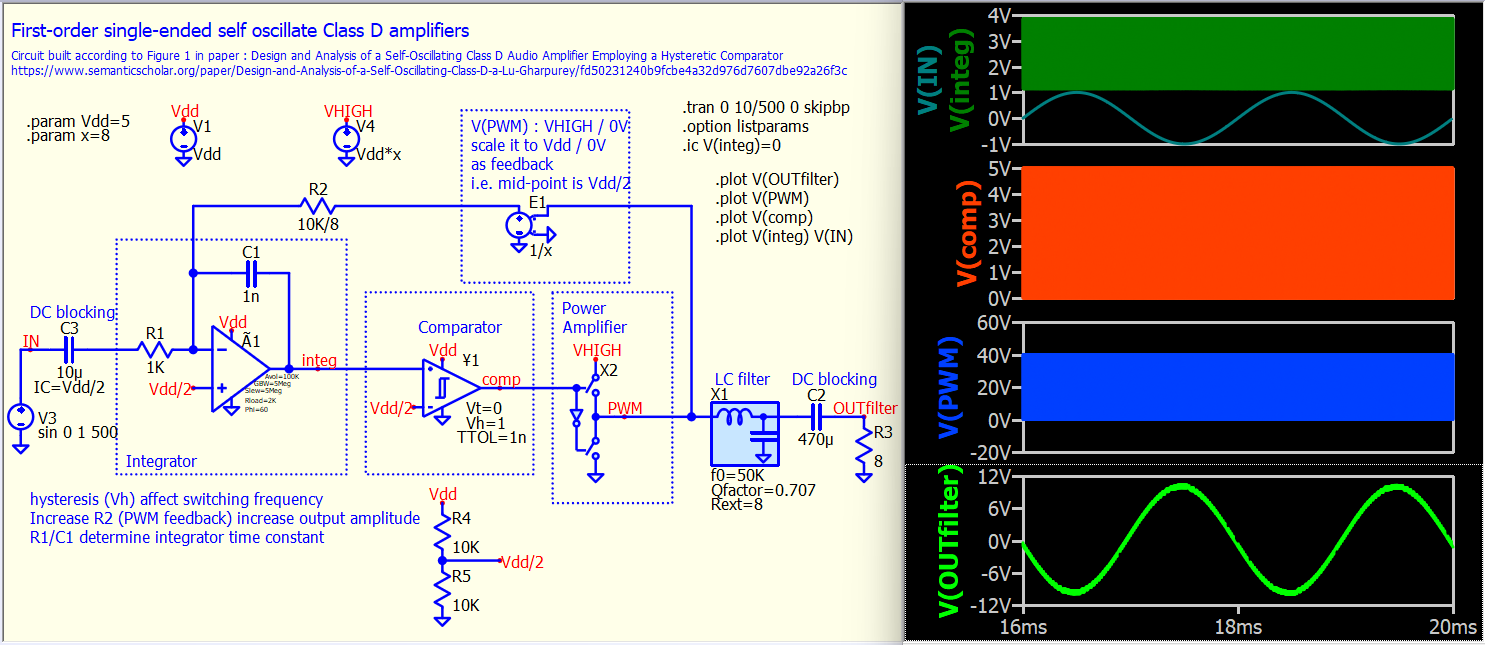
This is single supply version.

Self-Oscillating Class-D amplifier - 02 - Feedback PWM Out (Single Supply).qsch (17.5 KB)

Kelvin, thank you for providing alternative Class-D self-oscillating simulation circuits. (I’m still trying to get hold of that paper on which you based your circuits, but the authors haven’t yet responded to my request.)

For me, performing a circuit simulation is not some ‘theoretical’ exercise, but a means of checking the performance characteristi
Self-Oscillating_Class-D_amplifier_Feedback_PWM_Out_(Single_Supply)_DF_mod.qsch (17.0 KB)


cs of a circuit before building a prototype. For that to be useful, the simulation circuit should closely represent what will be built, and the simulation should accurately represent the behaviour of that circuit.

With that in mind, I modified your circuit to reflect more closely my intended configuration. I don’t need an output capacitor because this circuit is just half of a BTL configuration. The comparator I plan to use has complementary outputs, which will be used to feed the two gate driver ICs and thence the four GaN HEMTs. My Vhigh will be 36V, and Vdd 10V.

In terms of wanting the simulation circuit to closely represent what will be built, I don’t want any ‘theoretical’ components, like E1 and X1 – they can’t be bought off-the-shelf! (For the ‘Power Amplifier’ section, I’m OK with a ‘theoretical’ component there, since that doesn’t materially affect the operation of the self-oscillating circuit, which is what I’m trying to better understand and simulate.)

For your X1 component, I didn’t understand the specification Rext=8. I thought it might mean the inductor had an internal (DC) resistance of 8Ω, which would be way, way too high. The dual inductor I plan to use has an ESR(max) of 8.4mΩ for each half. While in terms of the simulation I’m trying to do (the self-oscillating part of the amplifier), the inductor ESR is unimportant, I replaced X1 with its simple components anyway.

It was unclear why you set R2’s value to ‘10K/8’. I wonder if you meant ‘10K/x’? In any event, I matched that value (1.25K) in my circuit. I can sort-of see why you specified the two supply voltages with parameters, but I prefer simple clarity (and the actual values I plan to use), so just set the two voltage generators to the required values.

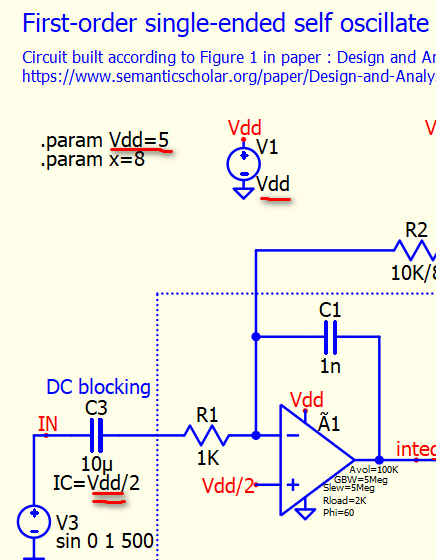
But your ‘.param Vdd=10’ (modified from your ‘5’) caused a strange issue. Having changed the supply specification at the generator, I assumed that parameter was no longer required. Yet when I tried to run a simulation without it, Qspice complained: ‘C3: Trouble evaluating “VDD/2” for IC.’ I assumed ‘IC’ was specifying that C3 had an initial condition (voltage) of Vdd/2 across it. But in my circuit the output of the voltage generator (V1) whose value is ‘10’ is labelled Vdd, so the value of Vdd is known (=10), so why does it also need a ‘parameter’ definition for an IC?

The next issue I have is with the simulation of the integrator output. Assuming zero delays through the comparator and from its output to the PWM output, as soon as the integrator output hits a comparator threshold, the current flow through the integrating resistor should change direction, so there should be an instant slope change in the integrator’s output. But instead, I see a vertical step in the integrator output, which changes the calculated timing since the integrator now must integrate for longer before hitting the other comparator threshold. There is a similar, though less pronounced and less time-corrupting, effect in your simulation.

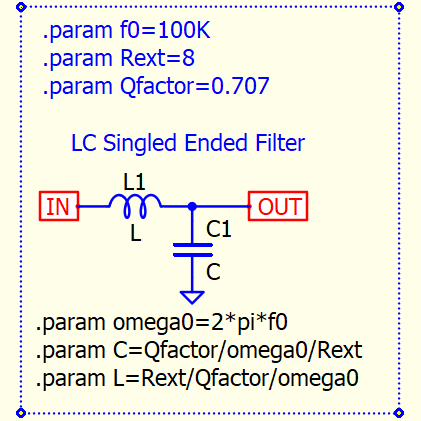
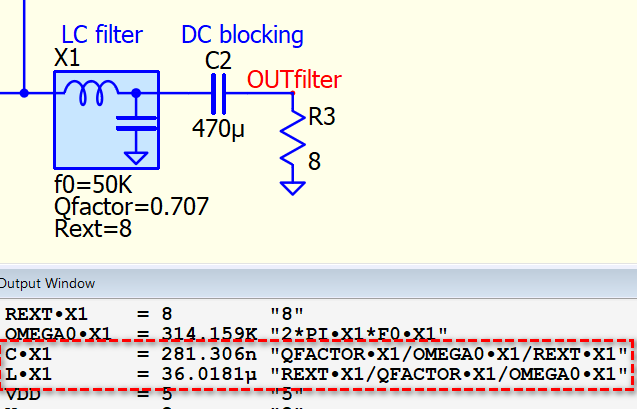
View > Netlist and you can check what inside the subcircuit. This is my custom subcircuit symbol, a LC low pass can be designed based on telling its expected load resistance (Rext), cutoff frequency f0 and Qfactor. In this way, I can quickly design a LC filter with proper control its gain profile at around cutoff frequency.

A technical reference is from TI LC Filter Design application note, section 3.3

In the schematic, with .option listparams , I can get the C and L of this low pass filter.

If you compare my dual-supply version with this single-supply version, you will notice that their overall gain is the same, i.e., 1V peak input to ~10V peak output. The feedback resistor in the dual-supply version is 10kohms. I would like to highlight that this feedback resistor is adjusted with 1/x in the single-supply version, where x is ratio of VHIGH/Vdd. Well, I should have used 10k/x to make it clearer. I have made this change in my file but have not uploaded it back to the forum.

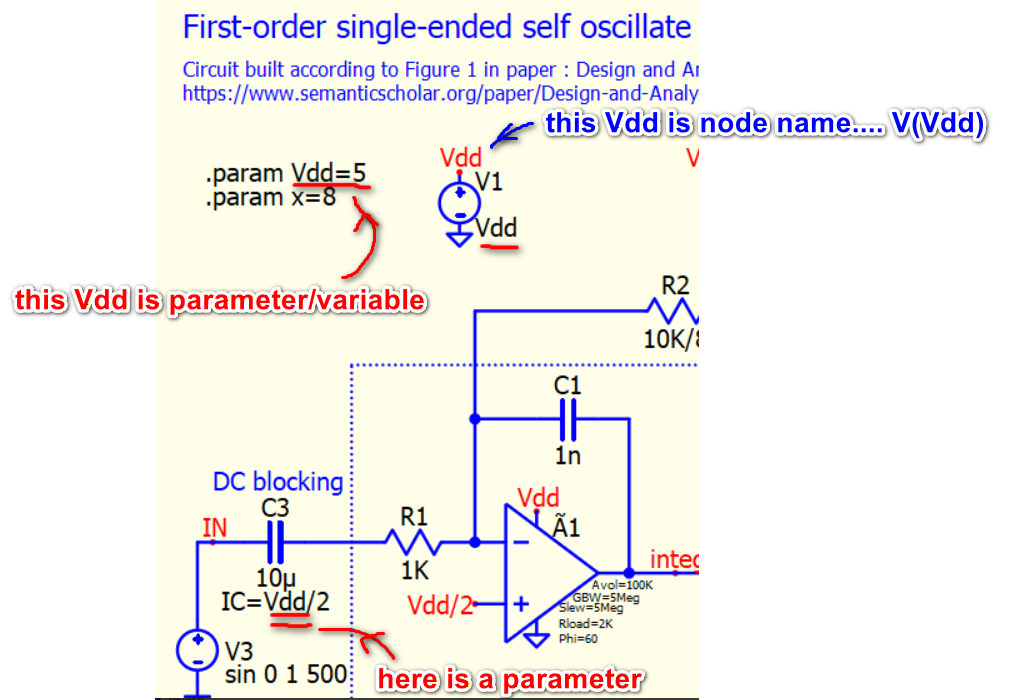
I use .param Vdd=5 to set the voltage value for V1, and also for the initial condition of C3 (this allows the DC solution to be calculated easier). If you remove .param Vdd=5 without providing a value to replace IC=Vdd/2, you will get an error indicating that a parameter is missing in the IC= equation.

Kelvin, thanks for your ongoing support, which I really appreciate.

Apologies for sticking my uploads in the middle of a sentence. Being my first uploads, I’m learning how the forum pages work. I expected that uploads would be ‘parked’ in a separate area (above, below, at the side) of the post text. Clearly that’s not the case here, and I should pay attention to where the text-insert cursor is next time I upload something!

I understand your LC filter subcircuit now. Thanks for the explanation. I already have TI’s slaa701a.pdf.

I also understand your use of .param Vdd=5, but what I don’t understand is why, when I changed V1 to have a specified voltage (10 in my case) and assigned it the name Vdd, why that doesn’t automatically make Vdd=10, which could then be used in the IC= statement.

And I’m really hoping you can answer my question about the deformed simulated waveform out of the integrator. Seeing that, I find it hard to trust any simulation from Qspice!

Is there a chance you confused the node name and the parameter name? I apologize for assigning the same name, which can be quite easy to mix up. In a capacitor, the instance parameter, e.g., IC=<value>, only accepts parameters as the pre-processing value.

Vdd is a node name, and Vdd/2 is ALSO a node name. If we put them into formula, they need to be V(Vdd) or V(Vdd/2). The B-source can accept an equation where you can include node names in the formula. Sorry setting up this schematic to a level that not be very user-friendly for new SPICE users.

I replaced the Qspice RRopamp (rail-to-rail op-amp) with a Single Pole op-amp. This change will eliminate the spike in the integrator output if Rout=1. However, increase Rout (e.g. Rout=2k), the spike reappear. This spike is related to the transition of V(PWM) along with the output impedance of the op-amp. Possibly current flow into Rout and generate a voltage drop in capacitor rapid charge and discharge at V(PWM) transition.

Self-Oscillating Class-D amplifier - 02 - Feedback PWM Out (Single Supply) [Opamp-SinglePole].qsch (17.6 KB)

Kelvin, thanks for that. I now understand the difference between a node and a parameter, and that they’re different even if they have the same name!

Thanks also for confirming my suspicion that R2’s divider should have been ‘x’.

Now I need to work through this self-oscillating circuit, using first-principles, to determine how PWM frequency and overall audio gain are determined by R1, R2, C1 and Vh, so I can calculate the appropriate values for my application.

Perhaps one other thing you can help me with is how to make a plot of PWM frequency vs simulation time (to picture how it varies with instantaneous audio amplitude). Preferably on the same display page as the waveform plots.

1 Like

:melting_face: I hope you can trust the simulations from Qspice now. I apologize for not delving deeply into what was causing the spike in the integrator before. Regarding your PWM measurement request, I cannot recall seeing such a real-time PWM frequency and duty measurement function in other SPICE programs. However, with Qspice, I have built one here.
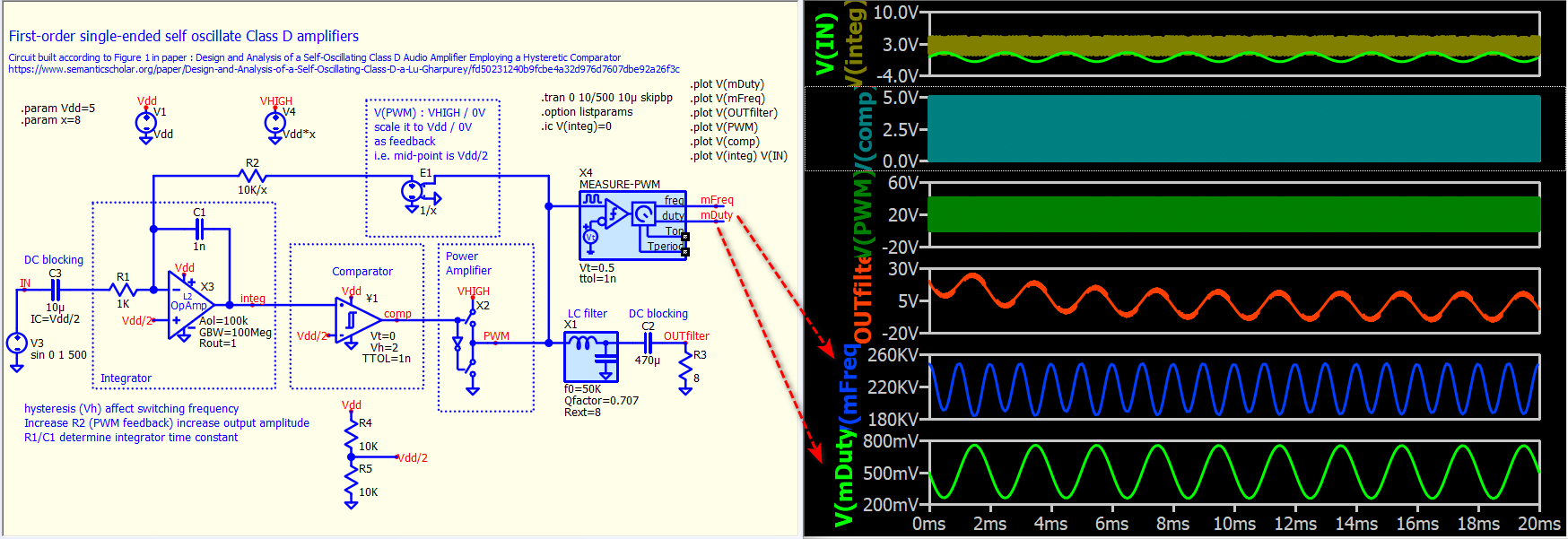
The challenge with this symbol is that you have to remember the time of the last rising and falling edges, and I have found a way to address this using the latch device (a native device in Qspice). If you visit my Symbol library, you will discover a vast collection of custom symbols that streamline your simulation process.
How to measure duty - QSPICE - Qorvo Tech Forum

Here is a schematic example include this Measure-PWM.qsym symbol.

Self-Oscillating Class-D amplifier - 02 - Feedback PWM Out (Single Supply) [1126].qsch (21.3 KB)

Excellent. You’re obviously a clever lad, and intimately familiar with Qspice! And I thank you sincerely for the work you have put into my little project. Thanks to you and Qspice, I now have a much better understanding of how this self-oscillating scheme works, which is not explained in detail in any of the articles (from IC manufacturers, and from uni student papers) that I have seen.

From here I hope to be able to develop some equations to calculate passive component values for a desired PWM frequency (peaks at zero audio input, and falls to a minimum at the two audio crests) and overall audio gain.

I didn’t ask for PWM duty cycle, but since you’ve provided it, I’ll ask a question about it… :grin:
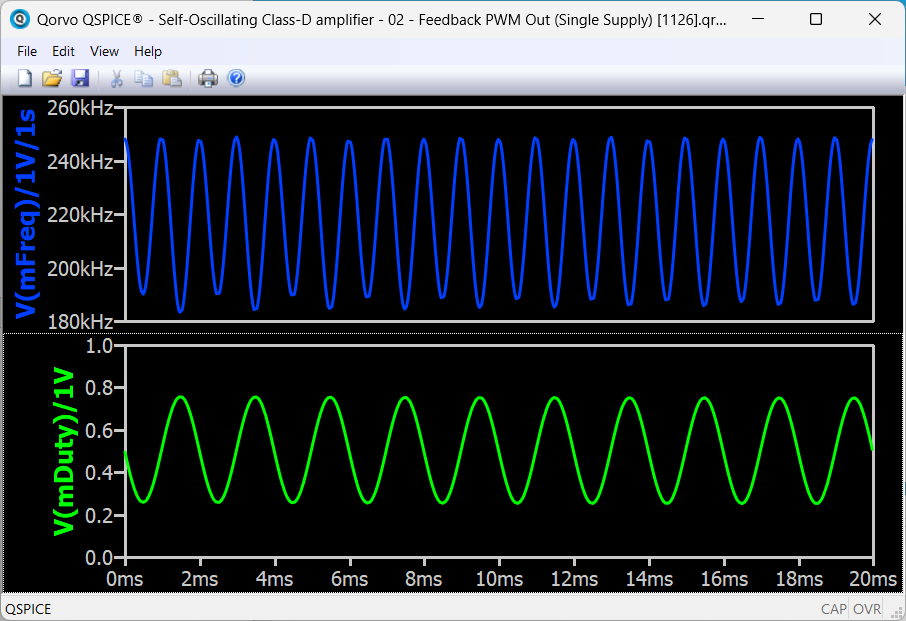
You express V(mDuty) in ms, so I don’t understand what you’re displaying. My understanding is duty cycle is the ratio of PWM ‘high’ time to cycle length, usually expressed as a %. For example, it is often recommended that a class-D amplifier not be run with a duty cycle less than 10% or more than 90%, outside of which distortion rises rapidly (apparently).

So if I were interested in seeing a duty cycle plot (I’m not, because I can gauge its range by the proximity of the output audio waveform to the power stage supply limits – 0V and 36V in my case), I’d want to see it expressed as a percentage (% high to total period).

Yes, it is weird that I have come across self-oscillating Class D audio amplifier designs from various sources, including people sharing them on LinkedIn, but I have not been able to locate a reference that explains its detailed working principle or simulation.

mFreq return 180kV~260kV, represent that frequency is 180kHz~260kHz. (any node is a voltage)… if you want to display Hz, change the trace to V(mFreq)/1V/1s
mDuty return 200mV~800mV, represent that duty is 0.2~0.8 (20%~80%)… if you want to display without unit, change the trace to V(mDuty)/1V

Could you please explain how to do this: visit your library, find a symbol, add it to my simulation’s library, and place it on a schematic? I had a quick look through your reference PDFs, but could not see how this is done.