Hi all,
I have models which consist of more than one SUBCKT. I read in the forum before to click “Include Entire File” which makes sense. I do that, and still get “Fatal error: no such subcircuit: ****”.
Here is one example, a simple Varistor model from the TDK website with SUBCKT:
.SUBCKT SIOV 1 2 PARAMS: T=1 C=1pF L=1nH B1=1 B2=1 B3=0 B4=0
R_SERIES 1 3 100u
L_SERIES 3 4 {L}
V_I_SENSE 4 5 0V
H_I_SENSE 6 0 V_I_SENSE 10k
R_I_SENSE 6 0 1G
E_VAR 5 2 VALUE={T*( PWR(10, B1+B2*(LOG10(LIMIT(V(6),1m,100G))-4)+B3EXP(-LOG10(LIMIT(V(6),1m,100G))+4)+B4EXP(LOG10(LIMIT(V(6),1m,100G))-4) ) -PWR(10, B1+B2*(LOG10(-LIMIT(V(6),-100G,-1m))-4)+B3EXP(-LOG10(-LIMIT(V(6),-100G,-1m))+4)+B4EXP(LOG10(-LIMIT(V(6),-100G,-1m))-4) ) +LIMIT((V(6)1kV(7)),-V(7),V(7)) )}
C_PAR 4 2 {C}
E_SW 7 0 VALUE={PWR(10,(B1+B2*(-7)+B3EXP(+7)+B4EXP(-7)))}
R_SW 7 0 1G
.ENDS
.SUBCKT S07K25 1 2 PARAMS: TOL=0
X1 1 2 SIOV PARAMS: T={1+TOL/100} C=1400pF L=10.0nH B1=1.7865297 B2=0.0618059 B3=-0.0005573 B4=0.0229985
.ENDS
I copy & paste that into QSPICE, it asks me which Subcircuit, I chose S07K25, click include entire file. When I simulate I get “Fatal error: No such subcircuit: SIOV”.
In the Symbol properties ‘Library File’ entry, the whole text is there with both SUBCKTs.
I also tried putting the model in a .lib file and give the path in the ‘library file’ entry, but i wont find the file, no matter where I put it.
I do get it to work if I paste the SUBCKT that QSPICE finds lacking when I put it in as a text directive like this:
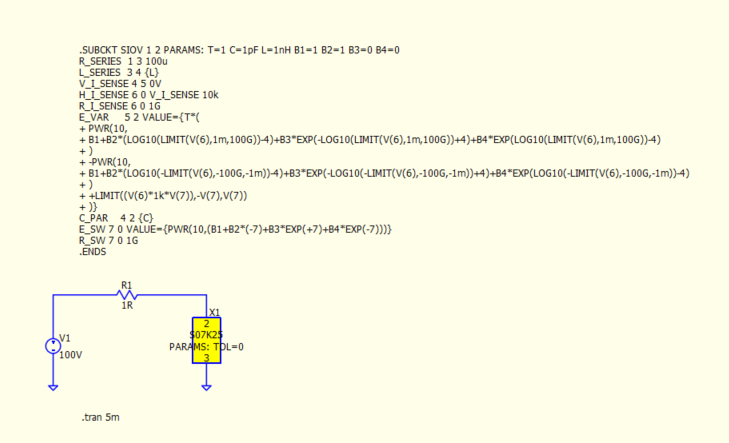
But if I start doing that for my whole project the schematic will become a huge mess.
Any tips what I am doing wrong here ? Maybe some preferences not set properly or something ?
I have installed QSPICE as ‘user’ because I dont have admin rights on my job computer, maybe that is the problem ?