first of all I want to thank Qorvo, Mike and the rest of the team for this very useful piece of software!
But there is one issue I am really annoyed about: after I update my Qspice installation, I still receive the update notification (“Your Qspice installation is xxx days old (…)”) at first program start after update. In fact, I have never started QSPICE without receiving this message. When then opening the version info in “help → about” the current version matches with my recently installed update. Very strange and it has a lot of potential to drive one into despair.
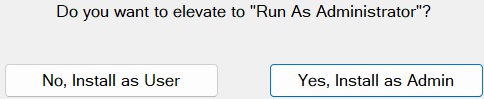
My personal suspicion is, that a former update (maybe because I installed accidentily as a user, instead as admin) left some trace somewhere in the system and the update-checker refers to that obsolete info instead…
I have not found any QSPICE version- or settings-files in the user directory. The registry (actually I do not know, if I am allowed to manipulate the registry on my company laptop) is also not very explanatory. How can this be resolved??
Possibly this is not a common occurrence. Have you tried uninstalling Qspice and ensuring that C:\Program Files\QSPICE is deleted after uninstallation? Then, reinstall Qspice to confirm if the problem can be eliminated. I encountered strange behavior once and resolved it with this method, just update or direct reinstall won’t solve that issue.
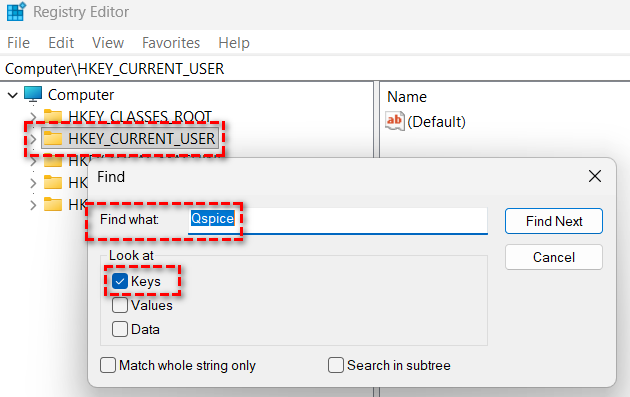
I am not certain if uninstalling will remove registry entries. The Qspice registry can be located using this method. However, be cautious when changing anything in the registry; I am just pointing out where it is for your reference.
In Registry Editor, Find Qspice in HKEY_CURRENT_USER and will bring you to its registry.
If all else fails, contact Mike via email (Qspice > Help > About), capture a screenshot of the issue you are experiencing as a bug report, and see if you can obtain a solution. The forum provides crowd support, you may not be able to receive official support through the forum, even if it is Qorvo official.
I ran into a problem when i updated as a “User” instead of my normal update as an “Admin”.
I ended up with TWO installations. The first in "C:\Program Files\Qspice" (Admin install location) and the other in "C:\Users{username}\Qspice" (User install location).
This is because the “update” service only installs and never uninstalls.
QSpice generally worked with few issues. However, I noticed some inconsistencies. Occasionally when I would perform an update, it would complain that certain executables that we’re older versions would not update.
I solved this issue by uninstalling the “official” location of QSpice (as Admin) and then manually deleting the User installed location. Then reinstalling QSpice. The problems disappeared.
Following your advice, I have uninstalled QSPICE and deleted all files and folders related to QSPICE in my System.
Even requested a new installer, since mine is from the very early beta phase, and re-installed.
Hopefully this will fix it, but I am still a little bit reserved… because the company setup forces me to use a second user profile as admin AND I probably did the mistake to just delete the obsolete files (installed as user) instead of uninstalling them.
We’ll see, when the next update arrives, I will not pause updates until I have tested this fix to work.
kind regards
flower
EDIT: for now, it seems to work. The fresh install does not notifiy me about avilable updates
Suggestion to Mike E: Once the first install occurs (as Admin or User), only use the current “InstallDir” to perform the update when available. This, in theory, would prevent the need to ask =>
It would automatically install the update to the proper Installation directory. It would require an official uninstall if the user wanted change Install configurations.