As the title suggests these are actually three independent questions. I have a circuit with a manufacturer model of a TI buck converter. The simulations takes ages (11.5 hours) for a short transient analysis. (I want to simulate the ramp-up phase.)
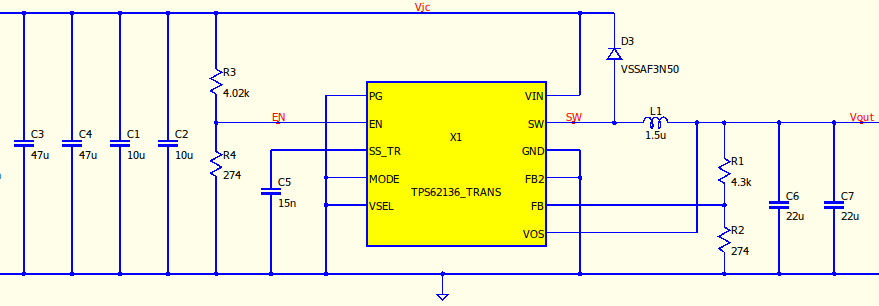
-
How to I capture the current flowing in/out to/from some of the ports of X1? Currently, if I simply run
.trans 6m, I can choose all the voltages for named top-level nets (i.e.v(Vic),v(SW),v(Vout), etc.) and currents through simple two-pole devices (i.e.i(C1),i(C2), etc.). I tried to add directives.probe(x1,VOS),.probe(X1:VOS),.probe(x1,6),.probe(X1:6),
i.e. port labels and port numbers as well as comma (
,) and colon (:) as the separator. In all cases I get the warning “Syntax error”. -
How do I save the raw file with all the captured data to disk? I see that Qspice creates a
.qrawfile, but the file is deleted as soon as I close the waveform viewer after the simulation. My current work-around is to keep the waveform viewer open, go to my file explorer, make a deep copy of the file with a new name and then close the waveform viewer. But there should be a better way than that. -
(That’s optional.) Is there any option how to run the simulation in a separate process in the background, optimally without having an open window? For example Ngspice has the option to run Ngspice in “batch mode” from the command line, give it a net list, a path to a log file and the path to the raw file. I am looking for something similar.
