after the QSPICE update or maybe Windows update I have an issues with running old simulations. The “Fatal error: 0: Trouble linking to file_name.dll” occur. Sometime it helps to open the C++ file and press the F5, but not for every file.
Is it possible that the DLL that fails was compiled as a 64-bit DLL? I don’t think that can happen with DMC compiles but I sometimes do that by accident when compiling with MinGW or MSVC. That’s the error message when I do that.
Well, I think this message indicates that QSpice couldn’t load the DLL – it exists but couldn’t be loaded with the LoadLibrary API call. Are the DLLs on your local drive (not OneDrive or other network-dependent locations)? I suppose another possibility is insufficient rights…
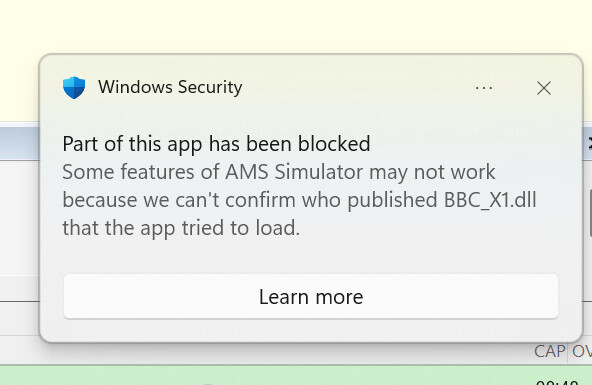
@RDunn I noticed that sometimes the Windows Security is blocking .dll files and probably this is causing an issue with “Fatal error: 0: Trouble linking to file_name.dll”. See attached picture.
Suggestion: Try deleting the .dll manually and recompile the source .cpp.
Maybe the virus checker on Windows can’t verify the source of the dll. However, a recompile of the source to generate the dll will allow Windows not to complain because it can tell you are the author (so everything is OK.)
Thank you @lpoma. I already tried this, but nothing changed. Funny fact is that it is enough to change one value of some variable inside the c++ code and the error will occur.
The problem disappear after disabling the Smart App Control in Windows, but you need to be aware that it is not possible to enable the Smart App Control again.
I came across this issue today and had the exact same behavior in that it will throw this error simply by changing a variable, but if you change the variable back to its original value when it was successfully running, it will work.
It seems like the permanent fix is for QSPICE to get certain verification.