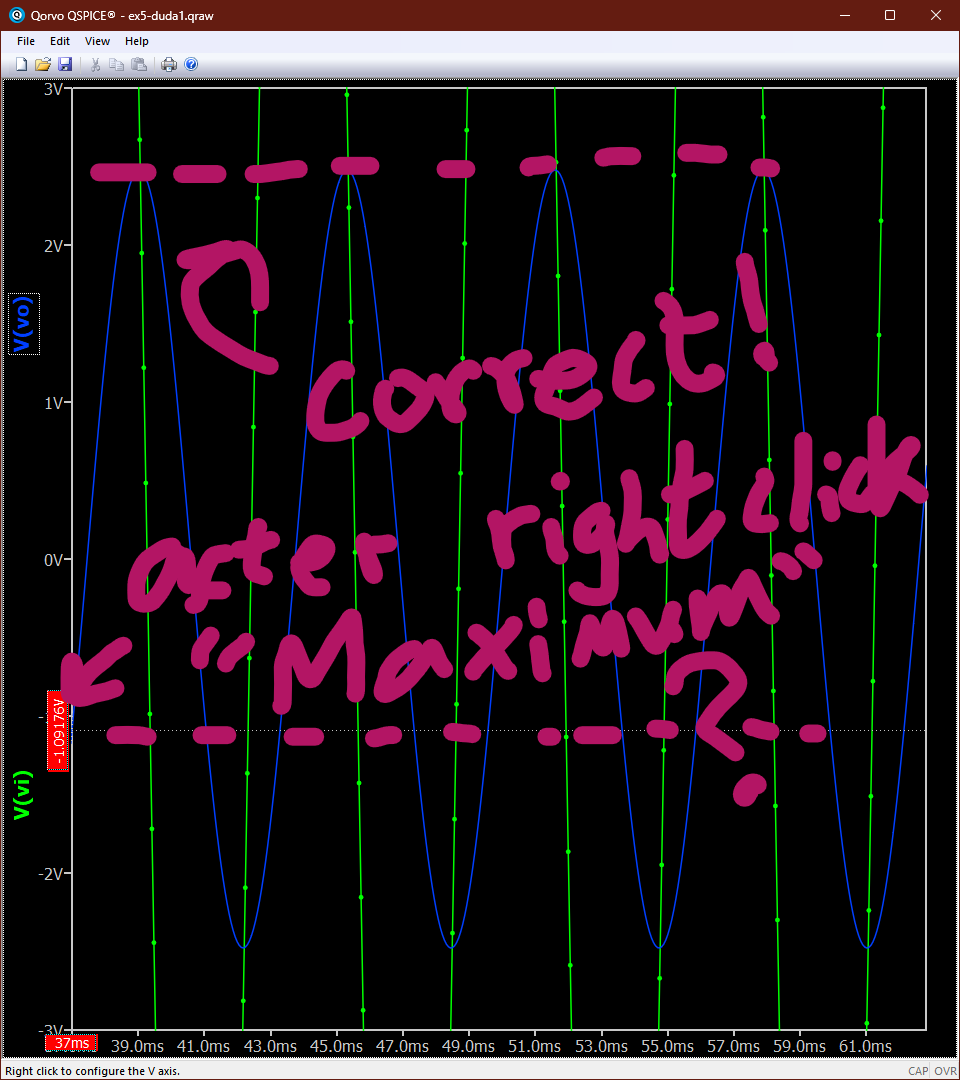
Zoomed out it works. Zoomed in it doesn’t. This image shows the result cursor after I clicked the maximum measure in it on a section of the plot I simulated with .tran.
And actually, the value it shows is never the actual maximum either. The peaks of the signal are much higher before this (and this is like the third third of the amount of ms I set it to plot).
Can you give some more details? I’m testing it with:
v1 x 0 sin 0 1 1
r1 x y 1
c1 y 0 1
.tran 4
.plot v(x) v(y)
Un-zoomed, I bring out the cursors for v(y), RClick → select maximum, it goes where it’s needed. Then I zoom in and the cursor stays where I placed it. Zoom out, same. Then I delete the cursor → zoom in → bring out the cursor → maximum, it does what’s expected, zoom out, same. As far as I see, it’s behaving as “advertised” but, maybe you did something else that I haven’t covered?
Update Qspice to fix it. For bug report, you can directly email to Mike next time, email address can be found in Qspice > Help > About 05/31/2026 Cursor positioning min/max functions are now limited to the zoom extent.
Yea so it seems like it is resolved now. But I think I get what you mean, it really was a non-deterministic bug I think, sometimes it did work and sometimes it didn’t when zooming in, still like 70% of the times it didn’t work. I think it probably depended on the signal tending to infinite, because it was usually a smaller peak than it was supposed to be, so it probably needed to be a damped signal to replicate the bug.
Anyways it’s working now, thanks for the replies guys.