I have a QSPICE model that mixes hierarchical schematics and Verilog. For example, in the screenshot below, the X3 block is a hierarchical schematic, while the X1 block comes from Verilog code.
My goal is to wrap these into a single symbol that represents the full schematic hierarchy and calls one or more compiled .dll files generated from the Verilog source.
The challenge is that part of the resulting netlist needs to reference these .dll files, and I’m not sure how to integrate them into the symbol so it runs correctly in simulation.
What’s the recommended process in QSPICE to combine a schematic’s netlist with .dll files from Verilog into one reusable symbol?
OK, the general process that I use is to right-click in this schematic and “create parent schematic.” In the created parent schematic, view the netlist and copy. Then open a new symbol file and paste the netlist. Edit the symbol graphics without messing up the port/pin numbers.
That said, I struggle with this a bit myself – especially when I make changes and want to edit the symbol without starting over. @KSKelvin is more likely to give you a complete and accurate answer.
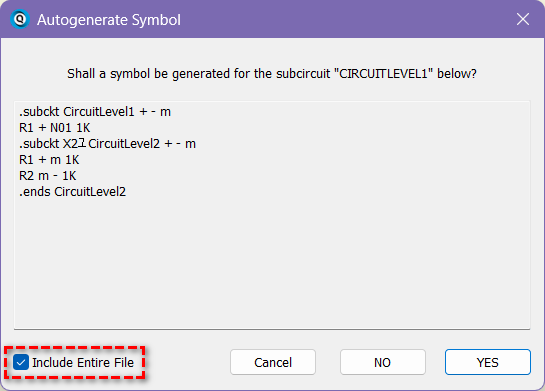
I assume you know the standard autogenerate a symbol process from a hierarchical block.
In your case, as you have multiple .subckt within this hierarchical block, make sure you select the option “Include Entire File” from autogenerate symbol. Or, some .ends line may be discarded in this process and return Fatal error in your generated symbol.
After this symbol is generated, this symbol file and .dll file must be share together. The .dll file have to be in same folder of the schematic that simulate, or it directory is added into Symbol & IP browser in Qspice.