Hi All,
Am I the only one experiencing Display() in C-block doesnt gets printed out in Qspice console?
Its mostly occured in a relatively complex circuit simulation…
*sorry, its in work project, so cant be shared…
Hi All,
Am I the only one experiencing Display() in C-block doesnt gets printed out in Qspice console?
Its mostly occured in a relatively complex circuit simulation…
*sorry, its in work project, so cant be shared…
I only know Display() is inactive during hypothetical call.
I put Display in Destroy() to printout the analysis result.
And sometimes nothing gets printed out.
My guess is that QSpice is terminating before the Display() is flushed. Try flush() (or fflush(stdout)). If that doesn’t work, replace Display() with printf() and then flush().
Interesting… Based on your description, this seems to happen without a very clear way to troubleshoot why. One question, if without the Display message, can you still see the elapsed time displayed in the Output Window?
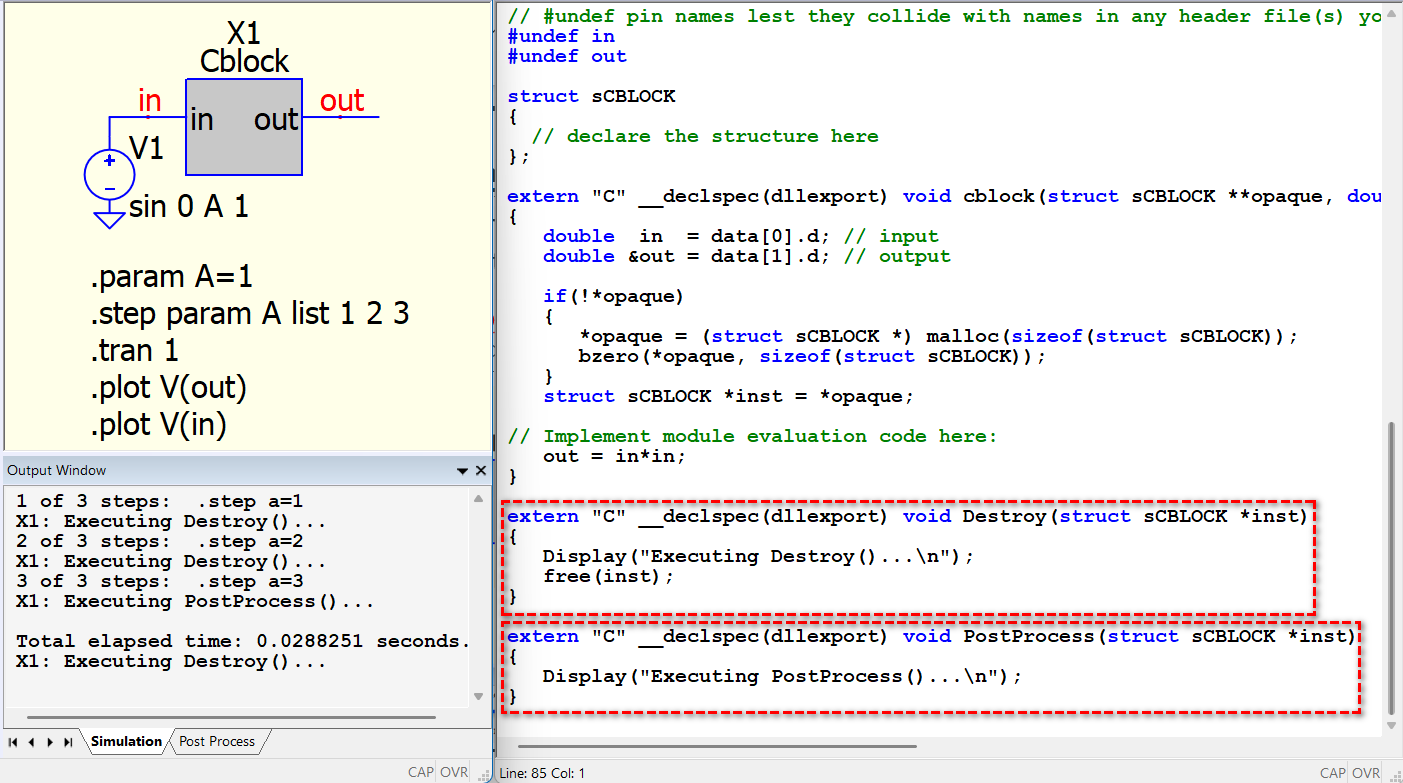
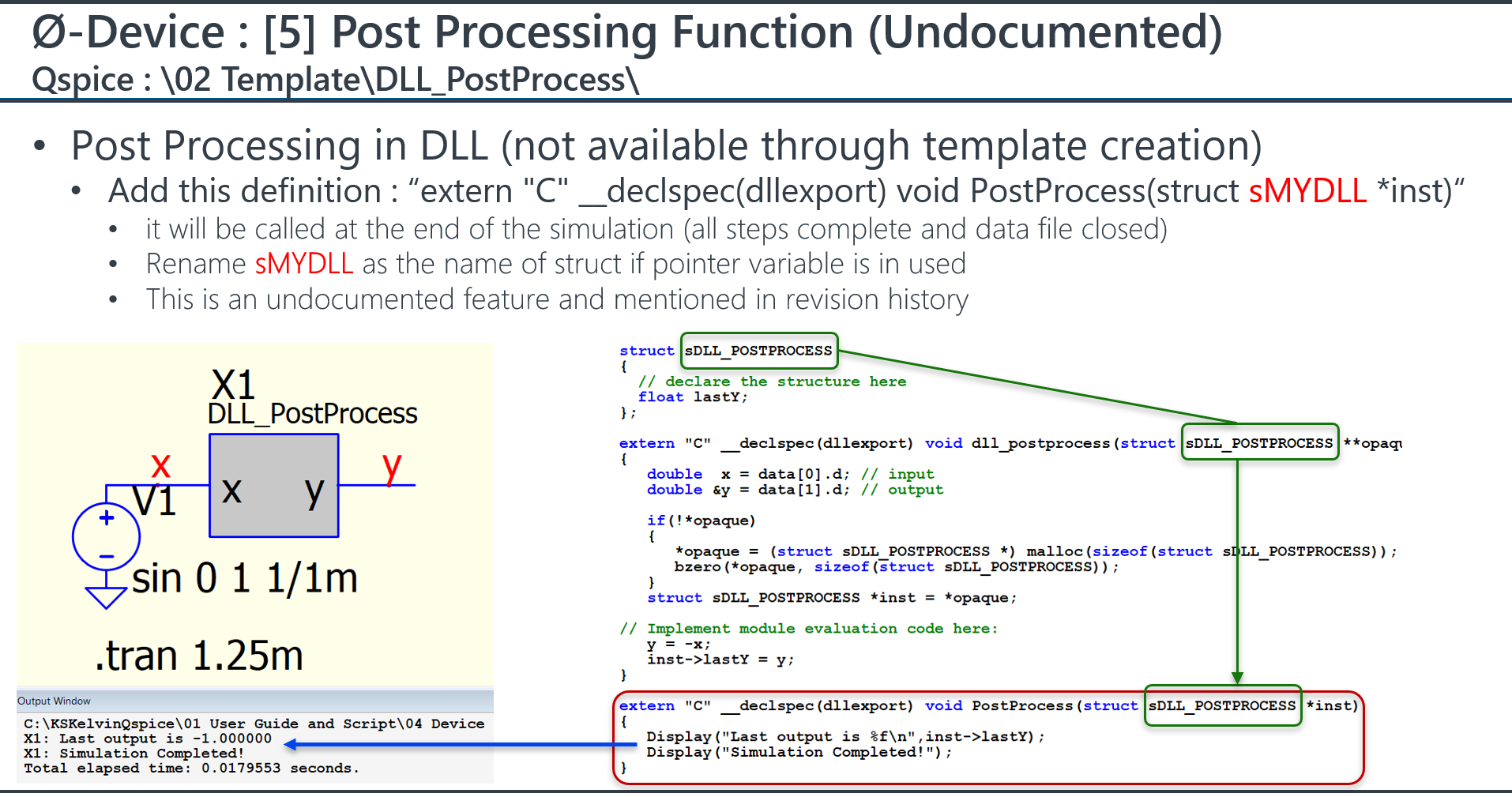
Well, if you only need the result once before the simulation completes (rather than after every .step finishes), you can check if the undocumented PostProcess() function can help. You cannot create this from a template, but you can manually add this function. As you can see, PostProcess() is run before showing the elapsed time and executing the final Destroy().
DLL_PostProcess.qsch (1.5 KB)
cblock.cpp (3.6 KB)
That sounds to be a good probable cause.
I guess I can add:
Display(“\n”);
flush or flush;
Before the memory is freed
I am curious how to cause this “not Displaying” intentionally…
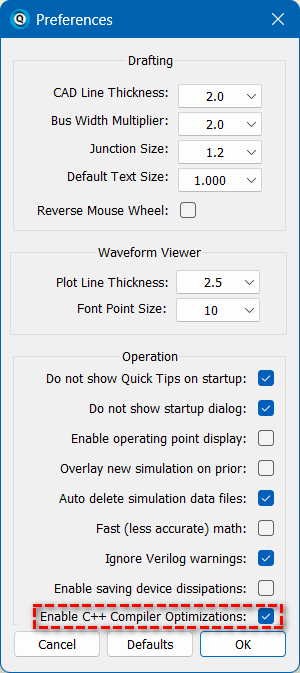
Maybe you can disable this to see if this weird issue disappears. I do not have any information on the background of why it was introduced, but I just noticed it in the revision notes, must be solving someone issue.
06/23/2026 The C++ compiler optimization is now optional.
Arief, please try running from command line without the changes. I’m curious if that also drops the output.
For now, the dll is compiled via vscode, I think the compiler option from Rob’s vscode task doesn’t invoke optimization yet.
@RDunn little problem. I am now on vacation, and that troubling sim is in work laptop.
HI,
I’ve noticed that Display() only works in main-level functions and subroutines. Ancillary and cleanup calls to DLL functions such as Trunc(), MaxExtStepSize() and Destroy() do not.
If I remember correctly, Display() function does not work in main-level functions if it is being called by the Trunc() function time-regressively.
Len
Good thinking, Len. Maybe *ForKeeps() is false in Destroy(). In that case, printf() should still work. @physicboy, when you get back from vacation, maybe check that?
@lpoma Display() can work in Destroy().
Thank you. I stand corrected.
Now it makes me curious what was happening when I tried it in a different cblock.
Len
OK, I did a deep dive into how text is moved from a DLL to the GUI Output window using Display() and printf(). It was not at all what I expected.
Conclusion: flush() will have no effect at all on Display() or printf() behavior when running the simulation from the GUI. Display() is faster and more reliable so avoid using stdout (printf(), etc.).
When running in batch mode (QSpice64.exe/QSpice80.exe), output goes to stdout so printf(), flush(), etc., are probably ok. You can determine if you are running under the GUI with GUI_HWND == 0 (if null, not running in GUI).
For the truly nerdy amongst us, here are some details when running a simulation from the GUI:
Why should you care? Well, my QMdbSim2 project opens a Java back-end simulator that generates stdout/stderr messages. I hope to capture these when running under the GUI and forward them with Display() to improve efficiency.
Anyway, now you know as much as I do…
–robert
Hi @RDunn
Thanks for the deep dive!
Just curious,
In my case, if it’s pooled, then does adding sleep()/delay timer for 1 sec or so may help to avoid the whole things closed down before we get the message printed out from Destroy()?
Anyway, @KSKelvin what’s PostProcessing function in Cblock? I believe I haven’t seen one ever.
This is an undocumented function that was only mentioned in the revision notes. My impression is that it was a response to a request from @RDunn.
Thanks,
So, Destroy() is called at every step (I have tested this), while PostProcessing() is only at the very last step?
PostProcess() is called at the last step, but it runs before Destroy() of that last step to ensure that member variables are not cleared up when calling PostProcess().
Quite possibly. I’d first run the sim in batch mode to see if the missing messages appear. If so, then sleep() should work. If the missing messages remain missing, then they are likely not being created.
So, I am back to office
my final solution at least for now is to add:
fflush(NULL);
Sleep(1000);
free();
It seems to do the trick for now.
the fflush(NULL) is used to force all the open stream to be flushed (Display and fprintf).
Not sure if the approach is correct or not…