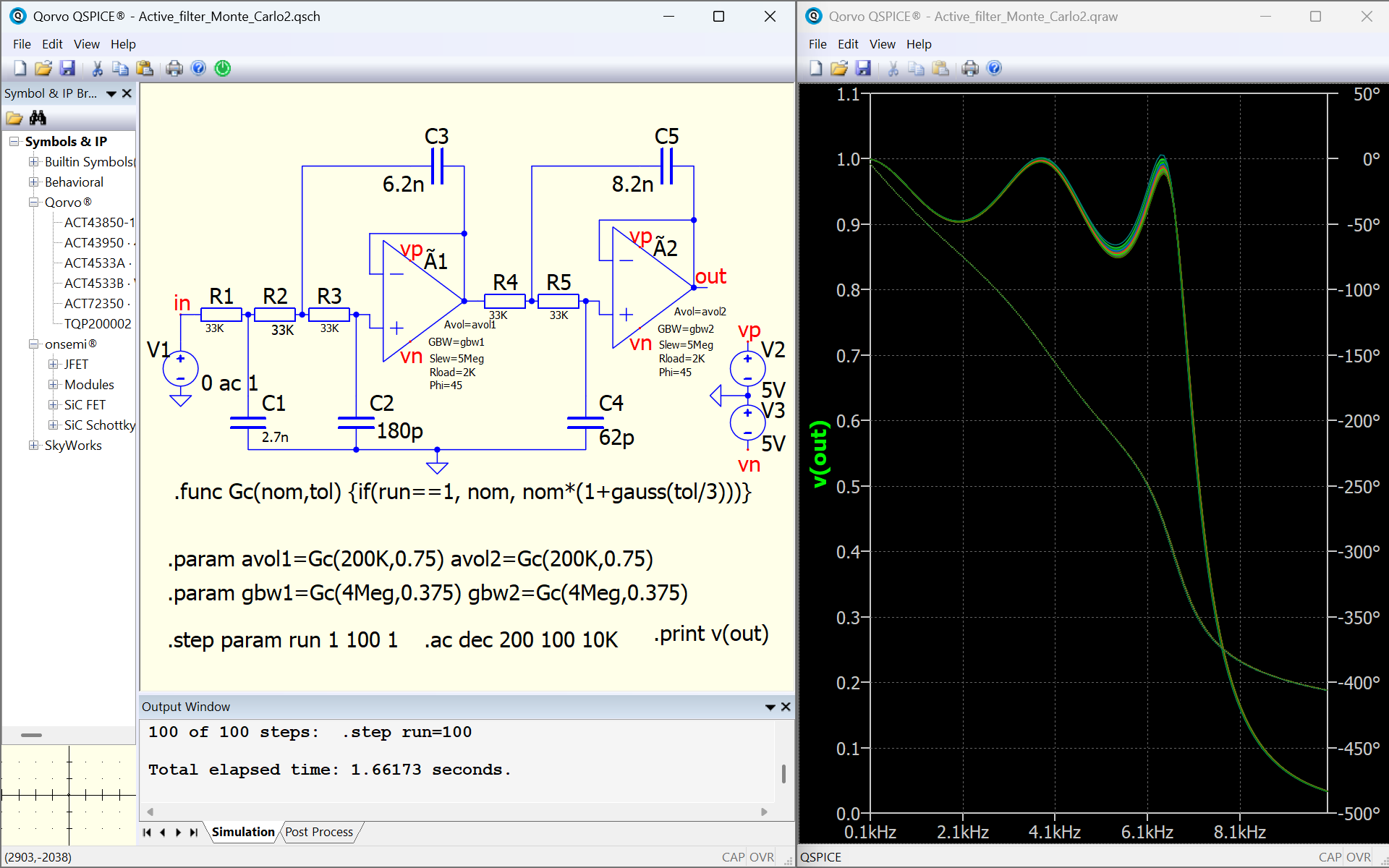
There were some LinkedIn questions on the Monte Carlo schematic capture (QSPICE Schematic Capture #070). Here’s another version of that circuit. Active_filter_Monte_Carlo2.pfg (212 Bytes)
Active_filter_Monte_Carlo2.qsch (12.3 KB)
1 Like
Thank you @mccunets ,
I’d like to note two potential issues with QSpice with this sim.
Issue #1:
If you execute the sim, you will get the same EXACT GC() values for each step every time you run it. This is an issue if you’re trying to get a good random sample of the monte carlo.
Here’s a partial output captured of the “random” avol1, gbw1, avol2, and gbw2 parameters for the 1st run and the 2nd run.
| step | avol1 (run 1) | avol1 (run 2) | gbw1 (run 1) | gbw1 (run 2) | avol2 (run 1) | avol2 (run 2) | gbw2 (run 1) | gbw2 (run 2) |
|---|---|---|---|---|---|---|---|---|
| 0 | 200000 | 200000 | 4000000 | 4000000 | 200000 | 200000 | 4000000 | 4000000 |
| 1 | 302984 | 302984 | 3708310 | 3708310 | 217799 | 217799 | 4270940 | 4270940 |
| 2 | 222748 | 222748 | 4398300 | 4398300 | 182279 | 182279 | 3958960 | 3958960 |
| 3 | 234451 | 234451 | 4380060 | 4380060 | 190246 | 190246 | 4552230 | 4552230 |
| 4 | 250154 | 250154 | 4234280 | 4234280 | 180126 | 180126 | 3976680 | 3976680 |
| 5 | 289161 | 289161 | 4372220 | 4372220 | 212137 | 212137 | 4481720 | 4481720 |
| 6 | 142585 | 142585 | 4205400 | 4205400 | 162688 | 162688 | 3638700 | 3638700 |
| 7 | 205058 | 205058 | 3704710 | 3704710 | 232817 | 232817 | 4972690 | 4972690 |
| 8 | 128737 | 128737 | 3923190 | 3923190 | 258483 | 258483 | 4435460 | 4435460 |
| 9 | 214889 | 214889 | 4387180 | 4387180 | 206285 | 206285 | 4515790 | 4515790 |
| 10 | 216653 | 216653 | 4709280 | 4709280 | 192290 | 192290 | 3918360 | 3918360 |
| 11 | 148920 | 148920 | 4164040 | 4164040 | 176967 | 176967 | 3875540 | 3875540 |
| 12 | 190117 | 190117 | 4074990 | 4074990 | 219689 | 219689 | 3990610 | 3990610 |
| 13 | 205378 | 205378 | 3551440 | 3551440 | 227852 | 227852 | 4256840 | 4256840 |
| 14 | 185926 | 185926 | 4240490 | 4240490 | 191623 | 191623 | 4801090 | 4801090 |
| 15 | 100990 | 100990 | 4630530 | 4630530 | 300162 | 300162 | 3838930 | 3838930 |
| 16 | 230022 | 230022 | 4223670 | 4223670 | 118266 | 118266 | 3049710 | 3049710 |
| 17 | 158248 | 158248 | 3650040 | 3650040 | 258493 | 258493 | 4078930 | 4078930 |
| 18 | 180562 | 180562 | 5656020 | 5656020 | 209388 | 209388 | 3931060 | 3931060 |
| 19 | 221737 | 221737 | 4071180 | 4071180 | 271833 | 271833 | 4483570 | 4483570 |
| 20 | 123025 | 123025 | 3930380 | 3930380 | 252484 | 252484 | 3786650 | 3786650 |
| 21 | 307689 | 307689 | 3925950 | 3925950 | 197840 | 197840 | 3518510 | 3518510 |
| 22 | 130446 | 130446 | 3658620 | 3658620 | 90032.4 | 90032.4 | 3780920 | 3780920 |
| 23 | 216960 | 216960 | 3854220 | 3854220 | 170303 | 170303 | 3510470 | 3510470 |
| 24 | 136024 | 136024 | 4349670 | 4349670 | 242080 | 242080 | 3427490 | 3427490 |
| 25 | 182458 | 182458 | 3826970 | 3826970 | 99586 | 99586 | 3503370 | 3503370 |
The parameters are identical from run 1 and run2. If that’s acceptable … then no problem.
Here is a simple fix. If I add the directive: “.options SEEDCLOCK” I do truly get randomized parameters from run to run.
Here’s a partial output captured of the “random” avol1, gbw1, avol2, and gbw2 parameters for the 1st run and the 2nd run with the .options SEEDCLOCK.
| step | avol1 (run 1) | avol1 (run 2) | gbw1 (run 1) | gbw1 (run 2) | avol2 (run 1) | avol2 (run 2) | gbw2 (run 1) | gbw2 (run 2) |
|---|---|---|---|---|---|---|---|---|
| 0 | 200000 | 200000 | 4000000 | 4000000 | 200000 | 200000 | 4000000 | 4000000 |
| 1 | 99066.8 | 230094 | 3973200 | 3710650 | 242487 | 142531 | 4368830 | 3656140 |
| 2 | 223299 | 178573 | 4452570 | 3992130 | 237386 | 170344 | 3856210 | 4495030 |
| 3 | 129566 | 219867 | 5436200 | 3378150 | 140847 | 174626 | 3102280 | 4526370 |
| 4 | 214823 | 289782 | 3764360 | 3685790 | 162889 | 189028 | 3901220 | 3896050 |
| 5 | 184928 | 212195 | 4450730 | 4137070 | 175628 | 161147 | 3675290 | 3706210 |
| 6 | 171717 | 215465 | 3632320 | 4307740 | 171884 | 126965 | 4457690 | 3825770 |
| 7 | 198111 | 196409 | 3127750 | 3954230 | 213419 | 169771 | 3340970 | 4904060 |
| 8 | 113898 | 179195 | 4713340 | 4363560 | 176614 | 189311 | 3669130 | 4271810 |
| 9 | 216053 | 197067 | 3765520 | 3669200 | 219271 | 190560 | 4591550 | 3936160 |
| 10 | 201309 | 191408 | 3770870 | 3892060 | 181966 | 79162.8 | 3822660 | 3836830 |
| 11 | 151593 | 132399 | 3062680 | 4088730 | 222056 | 60681.1 | 4735460 | 4326080 |
| 12 | 173595 | 193581 | 4003760 | 3722160 | 234267 | 118851 | 4679570 | 3554630 |
| 13 | 149505 | 226978 | 4121920 | 4265440 | 160019 | 285073 | 4119580 | 3865630 |
| 14 | 238609 | 225370 | 3089840 | 4323420 | 199878 | 231502 | 4729170 | 4290200 |
| 15 | 183963 | 182607 | 4874090 | 4336910 | 255134 | 141937 | 4727710 | 3851280 |
| 16 | 224755 | 227259 | 3933120 | 4061540 | 300328 | 215687 | 4308960 | 4886290 |
| 17 | 174336 | 261532 | 3984640 | 3643840 | 207702 | 195073 | 4259050 | 3477780 |
| 18 | 121901 | 283052 | 3641390 | 4675190 | 217868 | 122845 | 4759560 | 4326220 |
| 19 | 209471 | 169820 | 4155790 | 3633970 | 164764 | 214039 | 4272270 | 3351830 |
| 20 | 82690.9 | 231901 | 4250400 | 4607530 | 137171 | 248795 | 3667120 | 3697340 |
| 21 | 163748 | 246549 | 4472870 | 3694210 | 210166 | 187182 | 3869980 | 4564510 |
| 22 | 181650 | 244758 | 3422330 | 4013800 | 268216 | 192473 | 3753430 | 4240000 |
| 23 | 246938 | 133963 | 3695040 | 4368690 | 192687 | 368281 | 3359270 | 4526340 |
| 24 | 194017 | 246861 | 4723870 | 4193620 | 260575 | 137192 | 4171140 | 3414740 |
| 25 | 211399 | 267894 | 4271580 | 4793780 | 233851 | 179067 | 3311060 | 3816940 |
It can be clearly seen that the parameters from run-to-run are different.
The exception in both cases is the first step (0). This is intentional by the designer to provide the nominal values of avol1(=200K), gbw1(=4Meg), avol2(=200K), and gbw2(=4Meg) as a reference.
Issue #2
I’m currently gathering more data. Will publish in a later posting.
Len
This is not an issue but the nature of random generation by computer. Computer-generated random numbers are typically Pseudo-Random Number Generators. The random number is generated from a seed, and users can assign a seed with .option SEED=<value>. With the same seed, the random pattern is exactly the same in each execution.
To generate different random pattern in each execution, .option SEEDCLOCK can be used to utilize the system clock as the seed, ensuring that in each execution, the seed is different. This is essentially how random numbers behave in computer programming.
You pointed out an important aspect that the random pattern generated in the functions gauss() or random() only generates random numbers in its execution, but this result stays the same in every execution unless include .option SEEDCLOCK. I am only trying to explain that this is not an “issue” but rather a characteristic in random number generation. Issue typically implies a problem or something that needs to be addressed or fixed?
1 Like
I understand your statements. This is how the “random” functions may work without a random seed.
My concern is that in the Monte Carlo sim being presented, only 100 iterations are used. Therefore, without introducing .option SEEDCLOCK, all the results will be repeatable. Fine if this is the desire of the user. It does seem to fly in the face of what random functions are intended for. The consistency of randomness should be in the distribution of the curve (ie gaussian, linear, etc).
Issue #1 is a “potential” issue that I was alerting a user. If this is the desired effect, then the data will be repeatable.
Len
Issue #2
Here is an issue for me that I originally found in another sim. This issue can appear in the Monte Carlo stepped sim as well.
When assigning random value in .param in a non-stepped sim, the value remains the same value for the entire sim across ALL instances of my use of this in different components or directives in the circuit. This is as expected.
However, if I run this same sim as a stepped sim, EACH instance of the use of “varname” has a NEW random value! This is unexpected and, in my case, causes significant problems with obtaining accurate results.
Here is a simple reduced sim schematic to illustrate:
Random_Issue.qsch (2.3 KB)
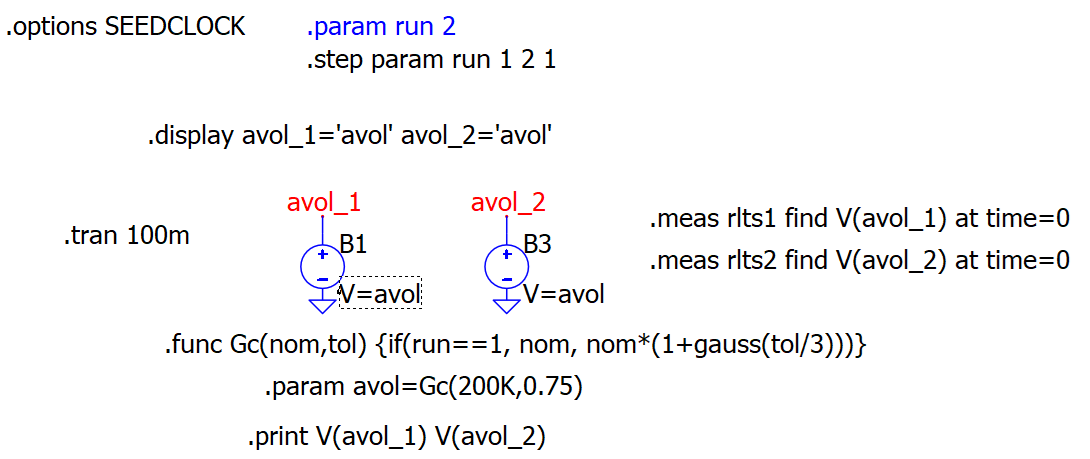
If I uncomment “.param run 2” and comment “.step param run 1 2 1”, I run the sim as non-stepped.
.DISPLAY AVOL_1= 172148.206739857 AVOL_2= 172148.206739857
.meas rlts1 find v(avol_1) at time=0:
172148 0.1
.meas rlts2 find v(avol_2) at time=0:
172148 0.1
In all 4 cases where avol was used (2 .display args and 2 B-source args), the single random value of 172148 is used.
I uncomment “.step param run 1 2 1” and comment “.param run 2”.
1 of 2 steps: .step run=1
.DISPLAY AVOL_1= 200000 AVOL_2= 200000
2 of 2 steps: .step run=2
.DISPLAY AVOL_1= 113615.304178692 AVOL_2= 175097.532498391
0 200000 0.1
1 167005 0.1
.meas rlts2 find v(avol_2) at time=0:
0 200000 0.1
1 123198 0.1
Only step 0 is the same non-random value (as per the .func GC(run=0))
The second step (step 1) has 4 different random values (113615…, 175097…, 167005…, 123198…).
In my opinion, this inconsistency in stepped sims can lead to unreliable data.
It is my opinion that once a parameter is calculated before time executing the sim, it remains the same. This is evident when my example sim is non-stepped. Same value throughout.
I used the .display directive to verify the “varname” value. To my surprise, it was “varname” was different in multi-stepped sims!
Applying this logic to the Monte Carlo sim in this thread: Imagine if the user wanted to use the same avol1 and gbw1 across both Amps in the 100 step sim. You couldn’t guarantee the same random value for each parameter.
Len
Don’t use .display to return a randomly generated parameter! I reported the use of .display to return a random value to Mike before. This is Mike’s reply. This is possibly one of the few situations where we don’t expect to have a solution.
Random() is going to return a different number every time it’s evaluated. The single quotes invoke an evaluation. I don’t know if I can reliably change that.
Interesting. So then, when a .param is called it is re-evaluated each time it’s used.
What explains my non-stepped use of it? In the non-stepped case, the random value parameter remains the same even though I called it 4 times.
Len