RF design rarely happens in a single tool.
A design may begin with system-level requirements, move into component selection and impedance matching, and eventually be validated in hardware.
This RF Design Tools area of the Qorvo Tech Forum is intended to connect some of those steps and provide a place for engineers to share workflows, examples, questions, and lessons learned.
A practical view of the design journey
One way these resources can connect is:
System Requirements → Component Selection → Impedance Matching → Validation
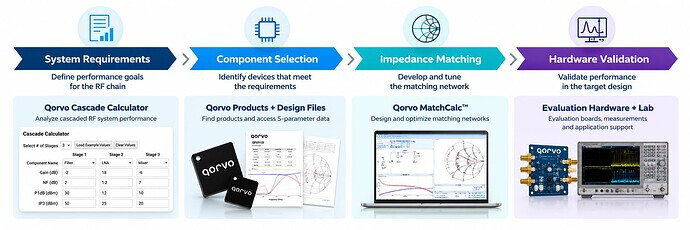
This is not intended to prescribe a required design process. Instead, it shows where the highlighted Qorvo tools and resources may fit as a design progresses.
| Stage | Engineering question | Qorvo resource |
|---|---|---|
| System Requirements | What does each stage of the RF chain need to deliver? | Cascade Calculator |
| Component Selection | Which devices can meet those requirements? | Qorvo Products + Design Files |
| Impedance Matching | How should the selected device be matched into the system? | MatchCalc™ |
| Hardware Validation | How does the design perform in hardware? | Evaluation hardware, lab measurement + Application Support |
1. Understand the RF system requirements
Before selecting a component, it can help to understand what each stage of an RF chain needs to contribute.
The Qorvo Cascade Calculator lets you combine active and passive RF stages and explore overall gain, noise figure, P1dB and IP3.
This provides a way to explore system-level tradeoffs and develop initial stage requirements before moving into component selection.
 Deep dive: Getting Started with Qorvo Cascade Calculator
2. Select candidate RF components
Once the requirements are better understood, the next step may be identifying devices that can meet them.
The Qorvo Product Portfolio provides product information, while the Qorvo Design Hub and Design Files provide supporting engineering resources, including available S-parameter files and documentation.
System requirements → Stage requirements → Candidate devices
3. Develop the impedance match
With a candidate device and its S-parameter data, impedance matching may be needed to integrate the device into the target RF system.
MatchCalc™ provides an interactive environment for developing and tuning matching networks using S1P and S2P data, including impedance, return-loss and Smith-chart views.
 Deep dive: From S-Parameters to a Matching Network - Getting Started with MatchCalc™
4. Continue into hardware validation
Once a candidate device and matching approach have been established, the design can continue into hardware validation.
Depending on the product and application, supporting resources may include:
- Evaluation boards
- Reference designs
- Samples
- Prototype hardware
- Lab measurement
- Application support
The Qorvo Design Hub brings together many of these product and engineering resources.
Related design resources
Cascade Calculator and MatchCalc are part of a broader set of Qorvo engineering tools and resources.
 Qorvo Design Tools Library
 Calculators & Simulation
For engineers working on power-system simulation, Qorvo also provides QSPICE® and an active QSPICE community here on the Qorvo Tech Forum.
Connect with the community
The Qorvo Tech Forum is a technical support network where you can connect with Qorvo experts and other engineers, share examples, and ask questions about the tools and workflows you’re using.
For application-specific support, contact appsupport@qorvo.com.
Next → Getting Started with Qorvo Cascade Calculator: Build Your First RF Cascade